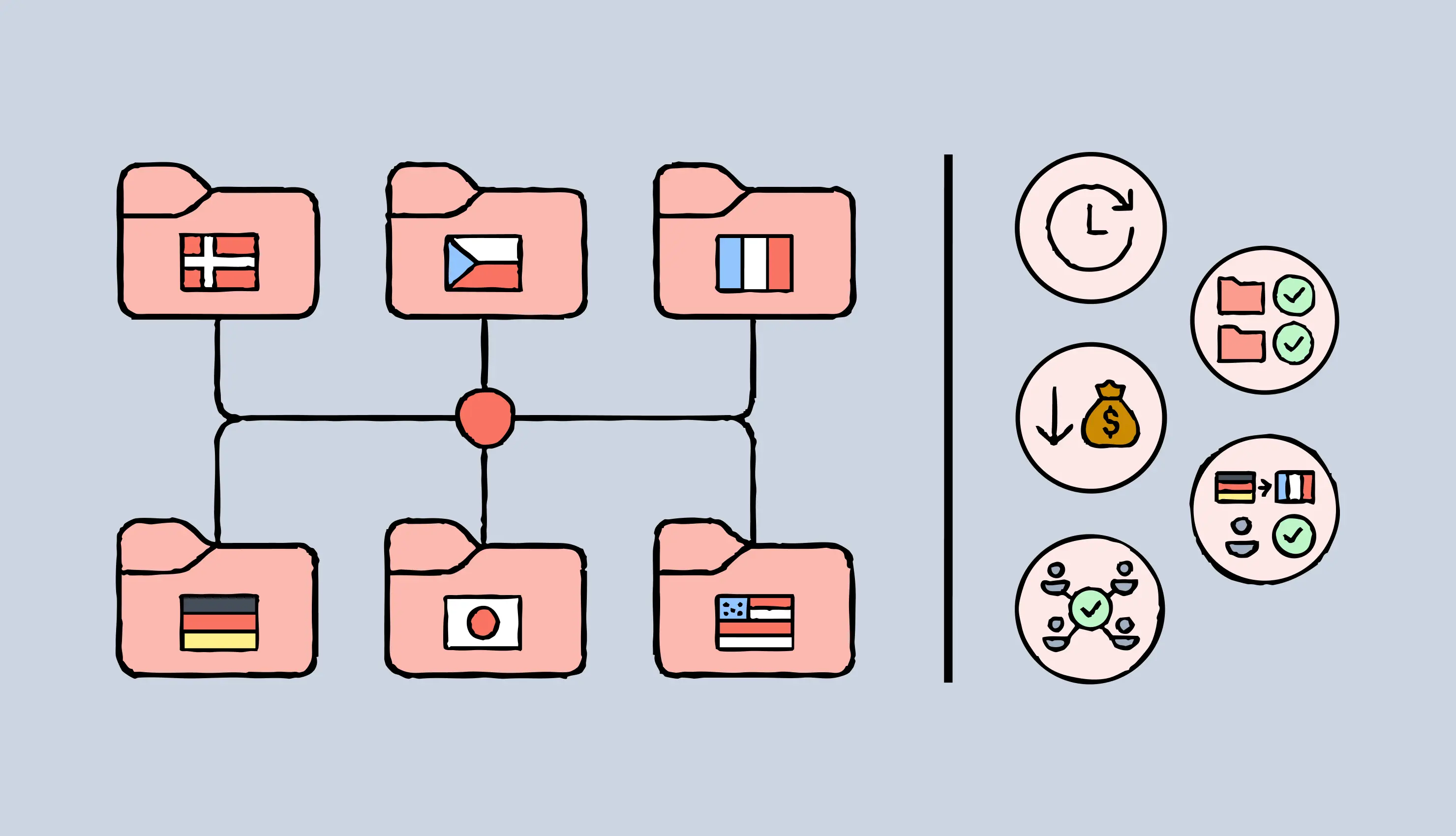
Every time you launch a new campaign, you have to translate everything across multiple languages — product UI, marketing pages, help docs, and more.
Without translation memory, translators start from scratch every time — even for content they've already translated. You pay full rates again. Every team uses its own terminology again. And your localization process delays market entry.
Translation memory (TM) software stores every translated string as a reusable segment in a database. Your TM automatically shows suggestions every time this string appears.
That means, you pay only for net new content, translators work faster, and your brand voice stays consistent.
But choosing the right TM software can be tricky. Not every software offers the same quality of translation suggestions or collaboration features.
That’s why we evaluated many translation memory tools to shortlist the six best options in the market. In this guide, we’ll review how these platforms handle TM setup, automation, context awareness, and team collaboration.
The right TM software can cut translation costs by 30-60% through smart reuse, reduce time-to-market by eliminating redundant work, and maintain brand consistency across every market.
The wrong choice? You'll end up wasting time on manual workarounds, paying to translate the same content twice, and watching quality slip through the cracks.
Centralized TM Manager with bulk update capabilities
Integrated multi-engine AI (ChatGPT, DeepL, Google)
Purpose-built for complex document layouts
1. Lokalise: Most intuitive localization platform with translation memory
Lokalise offers the best translation memory software for agile localization workflows. Whether you enter translations through the editor, upload files, or push via API, the cloud-based TM system automatically stores these units in one centralized database for your entire team.
When you're translating new content, you'll see inline TM suggestions with match percentages. The minimum threshold is 50%, so you won't waste time reviewing weak matches.
And if you want to work with existing translations, simply import these files. Lokalise’s machine learning algorithms will align source and target text to create new TM entries. This works even when your original and translated documents have different layouts or missing/varied elements.
Besides, your TM integrates directly with Lokalise's AI suite. Use pre-translation to automatically populate all 100% matches, then route the rest to human reviewers through Lokalise's in-context editor.
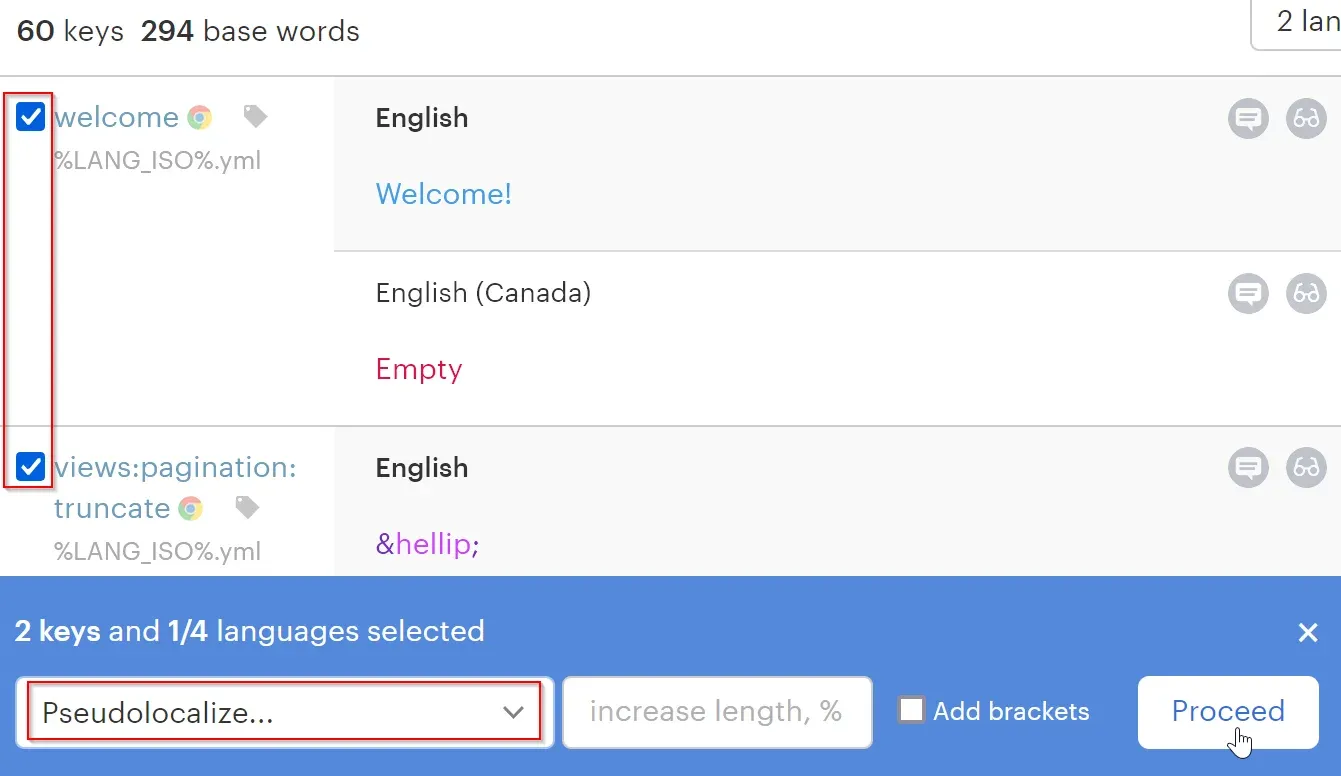
For larger projects, you can also apply TM suggestions in bulk. Select multiple keys in the editor and click “Apply TM” to implement the highest-match suggestions across all selected content at once.
Why choose Lokalise as your TM software
Translation alignment: Lokalise uses sophisticated machine learning models to automatically align source text with translations across documents without any manual adjustments. Your TM system works even if your source and translated content have different layouts, structural variations, or missing elements.
Flexible TM management: Team admins can create, upload, download, and manage multiple TM storage files (TMX format) from one location. Organize memories by content type, like marketing vs. legal. Set priority order for which TM searches first. Control where new translations get saved.
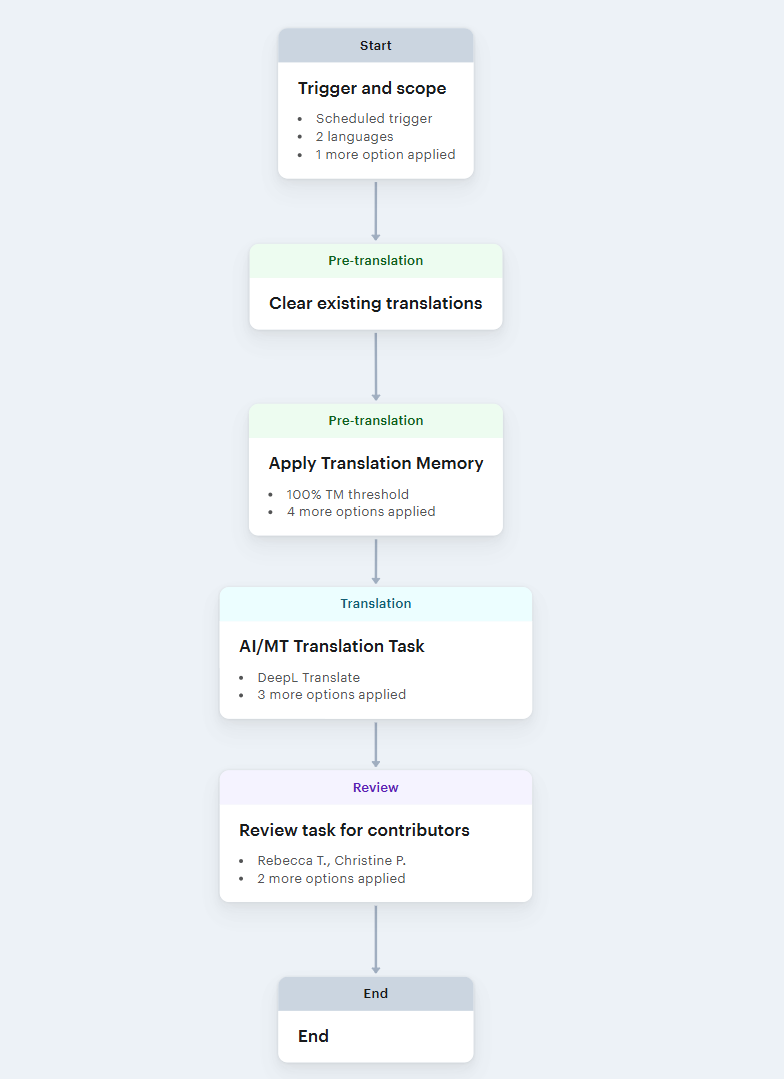
Automation built for speed: Create rules that automatically apply TM suggestions to relevant keys across every project. Combine these automations with pre-translation and machine translation for faster turnaround without manual handoffs. Route everything to human reviewers for final quality checks.
Here’s what an automated workflow template built using TM and AI translations:
What to know before choosing Lokalise
Advanced TM capabilities like multi-storage management and workflow automations are available in the Advanced plan or higher. The inline suggestions cap at 1,000 characters (roughly 150-200 words). This might not be ideal for long-form translation projects.
Pricing
Lokalise offers a free plan and a 14-day free trial for paid plans. Paid plans include:
Explorer: $144/month
Growth: $499/month (Some TM capabilities)
Advanced: $999/month (Full TM capabilities)
Enterprise: Custom pricing available on request
2. Trados Studio: Best for professional translators comfortable with complex tools
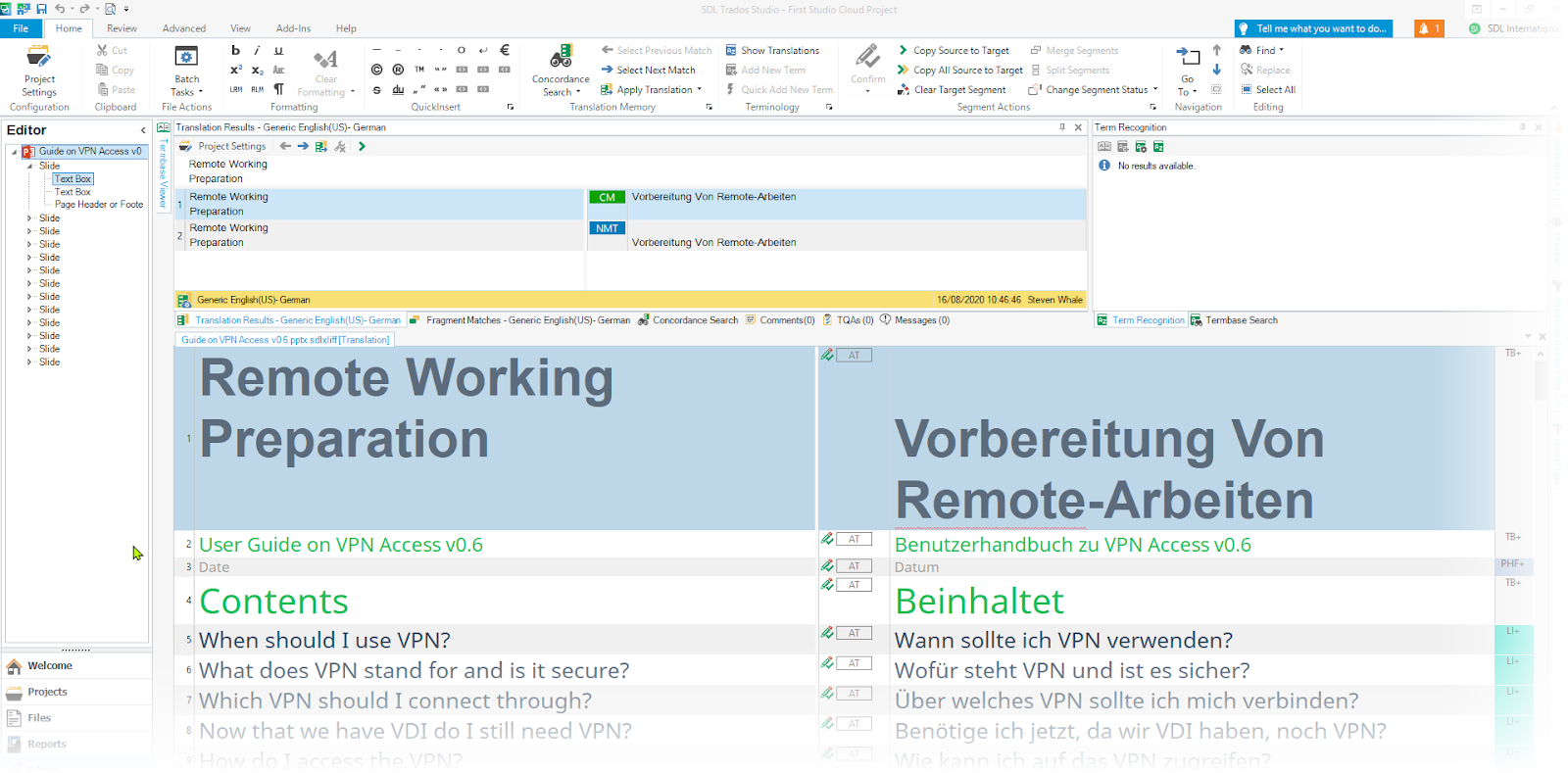
Trados Studio's TM engine saves both segments and paragraphs as translation units. With this approach, the platform captures context effectively to support multiple language structures. It's particularly useful when translating between languages with varying sentence patterns.
The platform's LookAhead feature searches intelligently in the background. While you work on translating one segment, it's already querying your TM database for the next two segments. This means TM suggestions appear almost instantly.
And Trados integrates its TM system with AutoSuggest dictionaries, termbases, and machine translation. This delivers real-time suggestions as you type.
What’s more, you can store TM entries in two ways. File-based storage works well for freelancers and small teams working across multiple projects. Server-based storage is ideal for larger organizations with hundreds of users managing centralized workflows across multiple languages.
Why choose Trados Studio as your TM software
Automatic fragment recall: Trados performs phrase-level searches automatically. It matches fragments within sentences to relevant translations. The platform shows you exactly where these translated phrases came from. You can verify they're contextually appropriate before applying them.
Context-aware matching: The platform stores structural and contextual information for every translation unit. This includes index markers, headings, list items, and document positioning. Your TM considers how segments relate to surrounding text, not just the text itself.
Multiple tool integrations: Trados integrates with several apps to extend its translation memory capabilities. These include multi-format conversion, data anonymization for GDPR, and custom TM workflows.
What to know before choosing Trados Studio
Trados has a steep learning curve. You'll need significant training investment for effective use. The interface can feel overwhelming. Many features are buried in complex menus, which creates confusion. Users report frequent stability issues, particularly when working with large files. The software demands substantial computing power for acceptable performance.
Pricing
Trados offers a 14-day free trial. It has different paid plans for freelancers, agencies, and corporations. Paid plans (annually) start at:
Freelance translators: $47/month
Translation agencies: Custom pricing
Corporations: $140/month
3. memoQ: Best for building offline and online TM databases
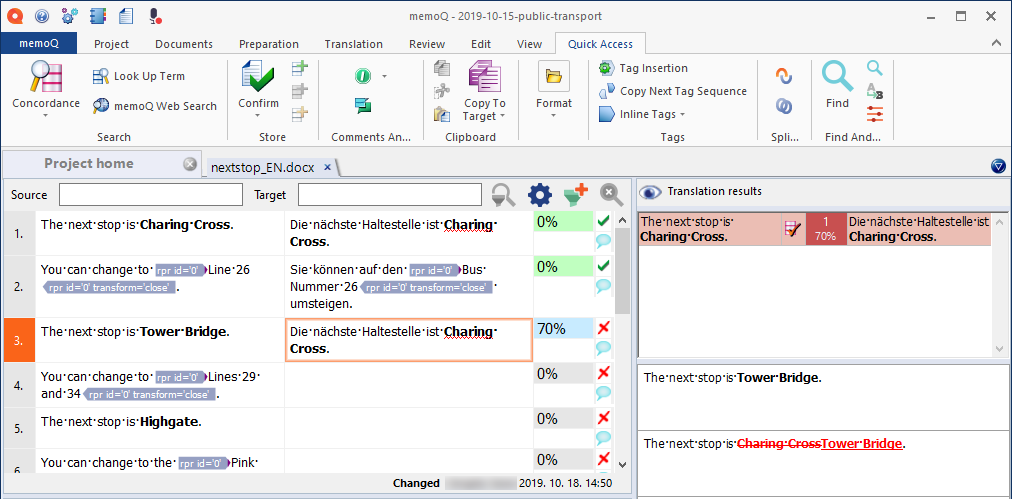
memoQ allows you to build and use three types of translation memories:
Local TMs stored on your computer for individual use
Online TMs hosted on memoQ servers for real-time team collaboration
Synchronized TMs that maintain a server copy for team sharing and a local backup for offline use that automatically syncs when you reconnect
memoQ stores bilingual TMs with one source language and multiple target languages. This means you'll create separate TMs for each target language you work with.
You can configure each TM to allow multiple translations of the same segment. Customize TM properties like subject, domain, path, description, client, and author. And enable the read-only mode if you don’t want anyone to edit your translation memory system.
The platform automatically saves translations to your designated “Working” TM for every project. It also uses your master TM database simultaneously.
Why choose memoQ as your TM software
Context-aware matching system: ContexTM captures text flow context (previous/next segments), ID-based context (identifiers for structured documents), and double context (both simultaneously) for higher accuracy. When there are two identical segments with the same context, the platform shows a ContexTM match with a 101% match percentage.
User roles in TM management: memoQ stores user roles (Translator, Reviewer 1, Reviewer 2, etc.) for every segment. The platform saves parallel entries from multiple roles. You can review and exclude translation units saved by a specific role, so that suggestions come from your main database with 100% match rates.
Advanced TM+ engine: memoQ also offers an advanced TM system designed for a server environment. It’s ideal for large-scale projects because it can store 10 million translation segments and deliver a more stable performance.
What to know before choosing memoQ
memoQ demands heavy processing power (CPU and RAM) for large or multiple projects. This can slow performance significantly. The platform's pricing isn't budget-friendly for freelance translators. This is especially true for those working with multiple clients using different CAT tools.
Pricing
memoQ offers one plan for individuals at $396/year. Paid plans for teams include:
Starter monthly: $242/month
Essential: $2,750/year
Essential Plus: $13,200/year
All the plans offer translation memories.
4. Smartling: Best for teams prioritizing machine translation and reporting
Smartling’s TM engine runs on SmartMatch, an automated workflow to instantly fetch and apply 100% exact match suggestions from your TM database. The platform takes care of the translation step on its own and routes content directly to designated workflow steps, whether that’s review, edit, or publish.
SmartMatch runs continuously in the background, even after initial authorization. It checks newly published translations against pending content to find fresh matches.
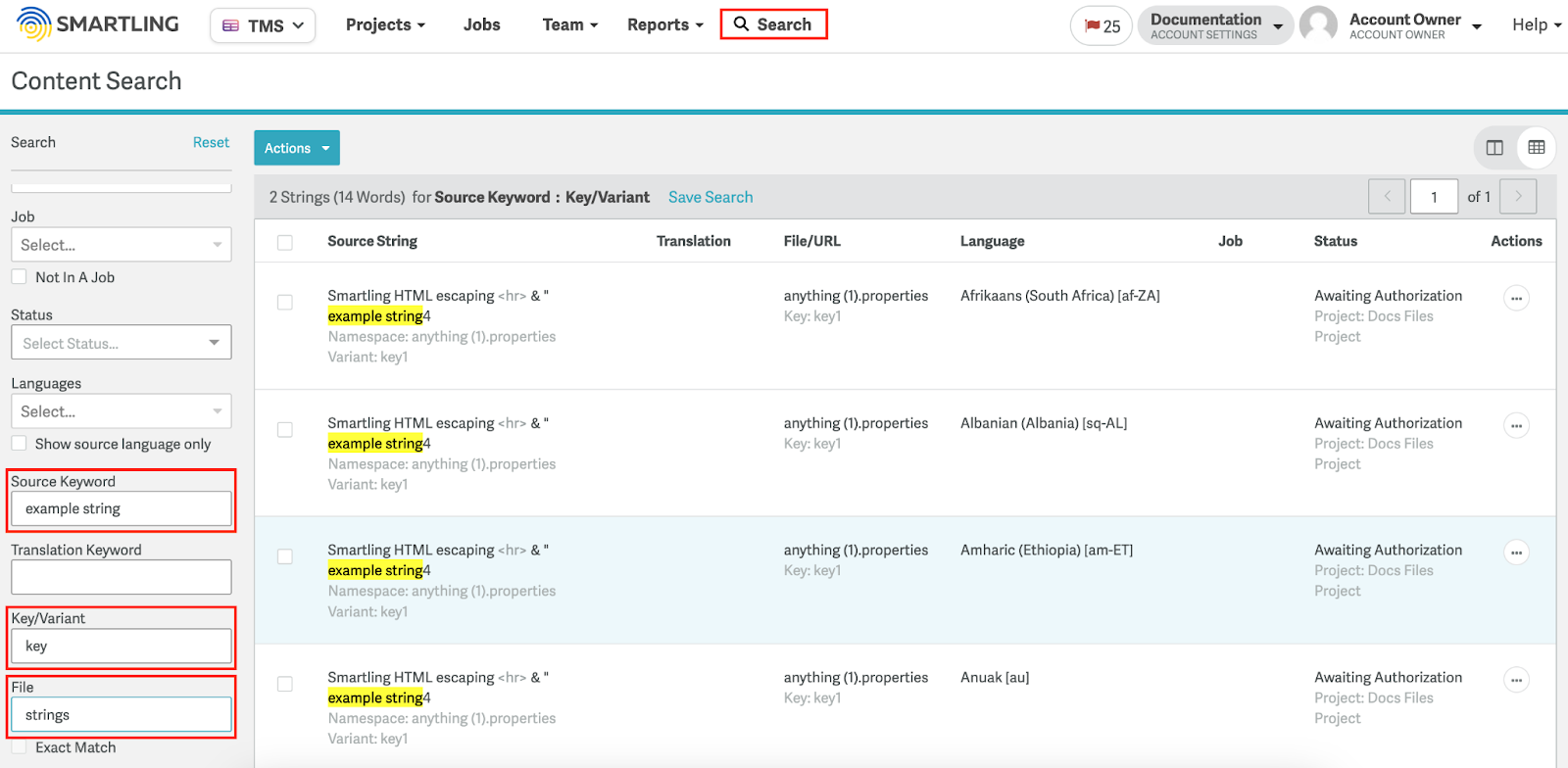
Besides, the tool’s advanced search functionality lets you locate and update translation units without manual spreadsheet management.
As a project manager, you can also see the number of SmartMatches used in a project. The SmartMatch Leverage Report visualizes data like the number of strings and words SmartMatched per day by language and project.
Why choose Smartling as your TM software
Machine translation workflows: Configure Smartling’s MT tool as the translation provider in your workflow. Then, the tool will automatically save MT output to your TM database once post-editing is complete. You can specify match thresholds (like 80%+) during MT processing to save segments in your database.
Custom SmartMatch rules: Create your own rules for TM matching for more granular control over matching criteria. Add rules about markup differences, whitespace variations, capitalization differences, or variant mismatches to improve automated suggestions.
Advanced search with precision filters: Find specific translation units quickly using keyword search (with variations like “running” for “run” and “runner”), exact character search (with quotation marks), or RegEx patterns for complex queries. Filter search by translator, date range, variant, key, or target language to locate and manage entries.
What to know before choosing Smartling
SmartMatch only works on strings without saved translations. It cannot overwrite existing translations, which can limit flexibility in some update scenarios.
More importantly, the customizable matching rules, while powerful, require careful configuration to avoid applying inappropriate translations when ignoring markup, spacing, or capitalization differences.
Pricing
Smartling offers two plans. The Core plan is free to start, while the Enterprise plan has custom pricing available on request. Both plans offer translation memories.
5. Phrase TMS: Best for teams with straightforward TM needs
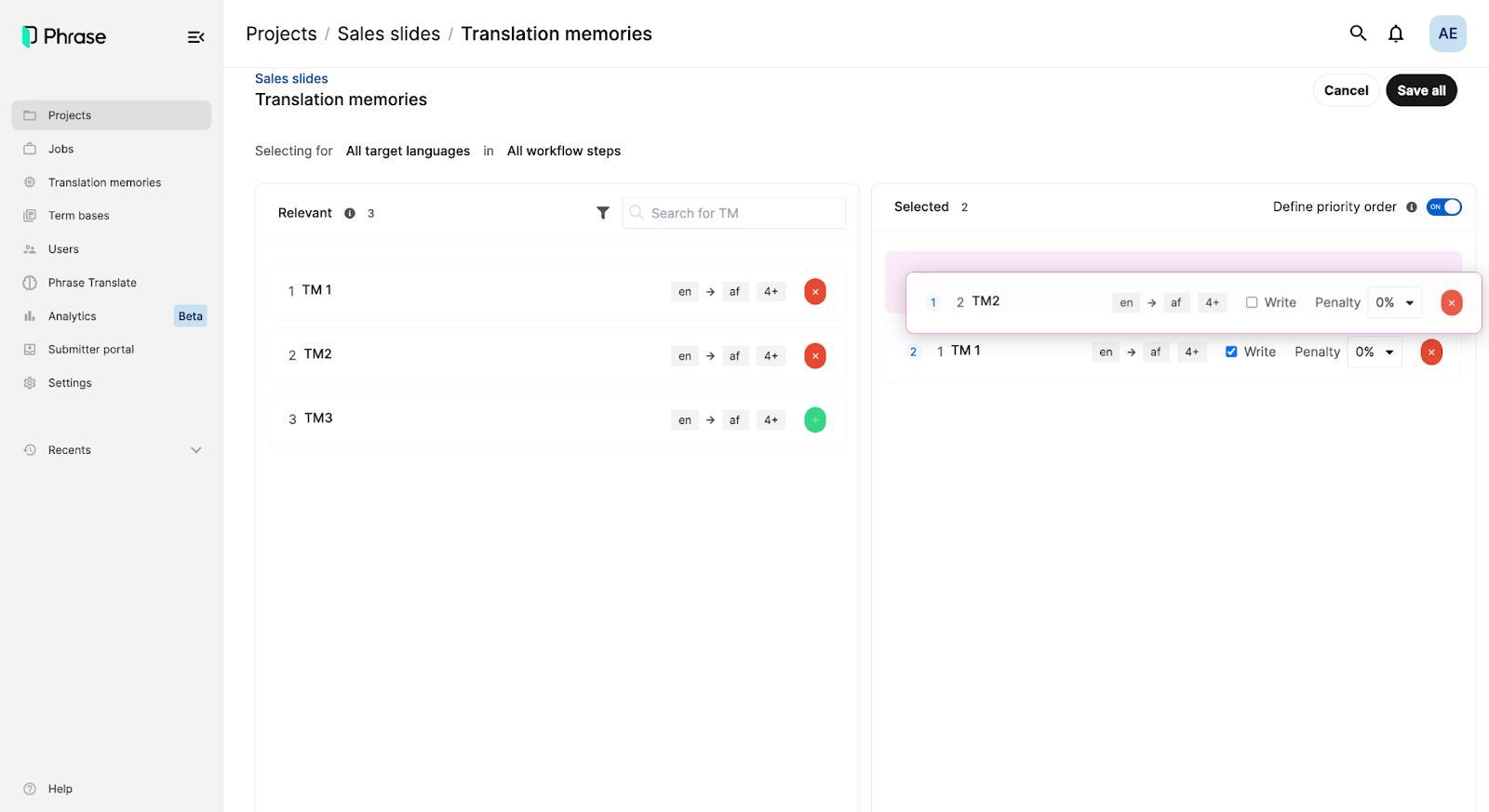
Phrase TMS allows you to build a TM for one source language and multiple target languages. For every new project, the platform automatically creates a designated project TM, giving you the option to upload your TMX, XLSX, or CSV files.
The TM system automatically selects the appropriate context type based on your file format:
Using segment keys for structured files like JSON, YAML, and XML
Previous/next segment context for document formats
You also have the flexibility to customize context settings per file import or disable context entirely when needed. This ensures TM matches are relevant to each string's actual usage.
You can also run pre-translation using TM matches to populate projects before translators start working. Pre-translation applies translation suggestions that cross a specified minimum score.
Why choose Phrase TMS as your TM software
Auto-substitution function: The platform automatically recognizes and substitutes non-translatable elements in TM suggestions (tags, HTML entities, placeholders, numbers) when they differ from source string elements.
Extensive file compatibility: Phrase lets you import files from other TMs and CAT tools in multiple formats, including TMX, MXLIFF, XLSX, and XLS. And you can export TM files in Excel for offline editing. Make batch modifications to update/delete markers before re-importing updated content back to TM.
Context-based 101% matches: Phrase’s TM system delivers 101% match suggestions when both source text and context (key/context or previous/next segment) are identical. You get superior accuracy for repeated content with similar contextual positioning.
What to know before choosing Phrase
A big challenge with Phrase’s TM function is that it supports only one TM per language pair rather than multiple TMs for the same language. This can limit organizational flexibility, especially when working on large projects.
Using TMs between Phrase TMS and Phrase Strings can also be a hassle. You have to manually export files from Strings to the TMS for every project. And you can’t import TMs in Strings.
Pricing
Phrase offers multiple plans:
Freelancer and LSP plans: Start at $27/month
Developer and designer plans: $525/year
Business plans: Starts at $1,045/month
Advanced TM capabilities are available in the Business plan.
6. Redokun: Best for document-heavy translation workflows with complex layouts
Redokun’s translation memory system is purpose-built for document translation workflows involving complex and varied layouts.
The platform’s TM engine works in two ways:
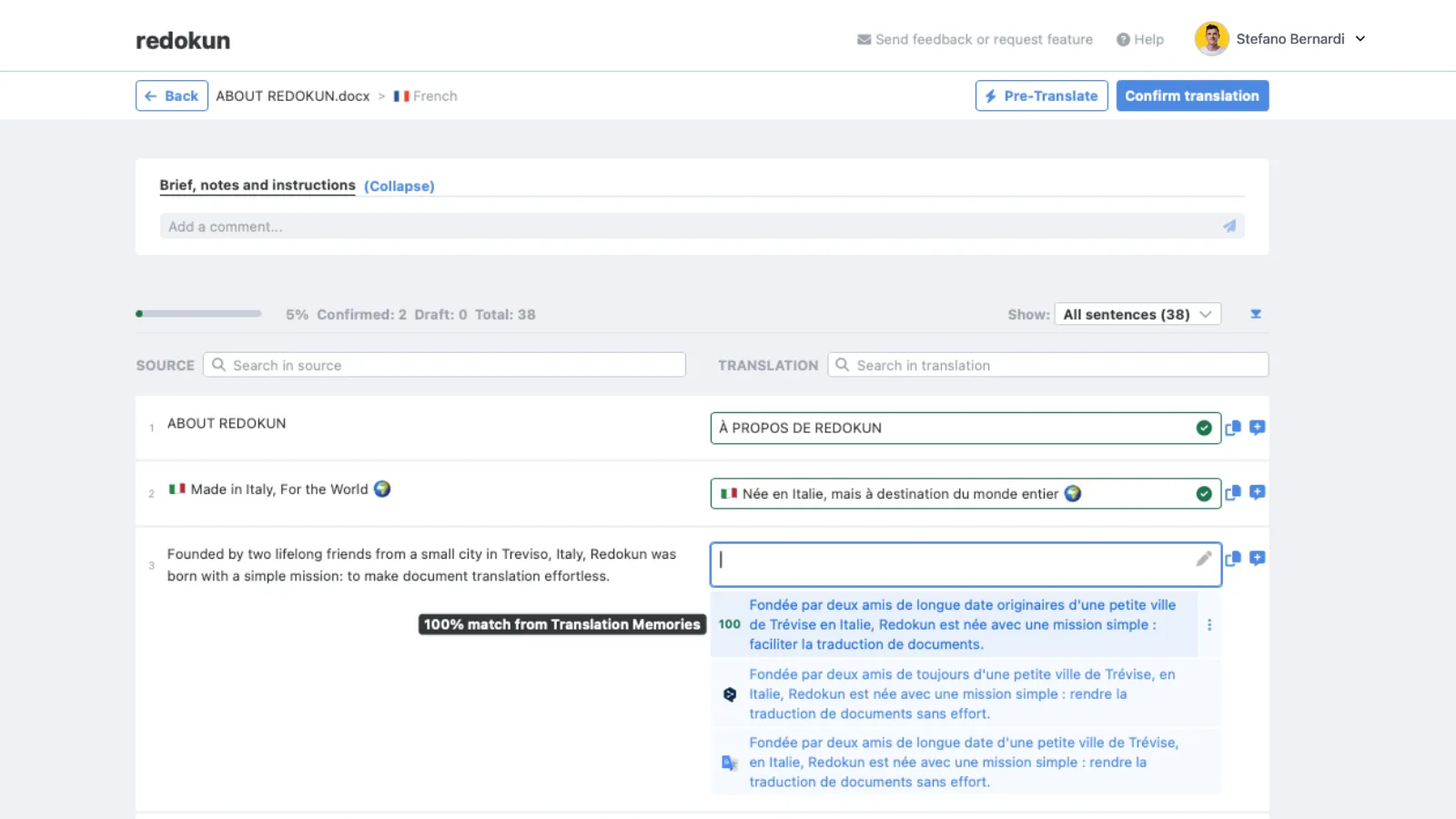
Real-time suggestions in the web editor with match percentages
Automatic document pre-translation for identical matches
The platform shows a “100% Match” when the source segment is identical to one stored in your TM and a “100% Match with Same Context” when the segment and the surrounding text are both identical.
Redokun's TM seamlessly integrates with its AI translation features (ChatGPT, DeepL, Google Translate). This way, you can improve AI-generated output based on your pre-saved TM and glossary suggestions.
Besides, Redokun lets you import existing translations via TMX files (max 100MB) from professional LSPs or via Excel templates for TMs built on past projects. The platform automatically removes duplicate entries and creates locale-specific storage for regional language variants (e.g., German, German-Austria, German-Belgium).
Why choose Redokun as your TM software
Centralized TM Manager: Search, edit, and manage translation segments across all documents from one workspace. You can also control what translators see during the translation process. Plus, Redokun’s TM manager allows bulk updates for instantly applying changes to all identical entries across your database.
Translation alignment tools: Convert your existing translated documents into reusable TM segments by using compatible tools like Matecat Aligner and Stingray Document Aligner. Map source and target segments, then import the resulting TMX file into Redokun.
Integrated AI translation workflow: You can combine AI translation from multiple engines (ChatGPT, DeepL, Google) with translation memory suggestions to fast-track your translation process. It also enhances your AI output with approved TM matches and terminology guidelines.
What to know before choosing Redokun
Redokun supports only a single TM per language pair rather than multiple TMs for the same language combination. This can be challenging for teams managing multiple clients or projects with different terminology requirements.
Pricing
Redokun offers a 14-day free trial. Paid plans include:
Starter: $125/month
Basic: $325/month
Premium: $650/month
Enterprise: Custom pricing
All the plans offer translation memories.
What to look for in translation memory software
When evaluating multiple translation memory software, focus on these capabilities:
Ease of TM creation: Some platforms require separate TM databases for each language pair (e.g., English-French, English-German) as distinct TMs. Others let you create one TM with a single source language and multiple target languages. The more flexible your setup, the less administrative overhead you'll face as you scale to new markets.
Context-aware matching: Does the system recognize when identical text needs different translations based on context, document structure, or surrounding segments? Context matching prevents false suggestions and reduces review time.
Seamless workflows: Your TM should connect directly with your existing translation setup rather than requiring multiple file exports and imports. Check for native integrations with your localization platform or CMS. If you're building custom workflows, see if an API is available.
Collaborative infrastructure: Teams with multiple contributors should look for the ability to make TMs accessible without version conflicts. Look for real-time collaboration features such as role-based permissions and approval workflows to proactively manage your TMs.
Scalable storage management: One TM for everything creates problems. You need separate databases for different clients, content types, and confidentiality levels. Check whether you can create multiple TMs, prioritize them by project, and maintain performance at scale.
Quality control built in: Your TM should integrate with your translation glossaries, score translation quality, and flag terminology conflicts before they spread across projects.
Finally, choose the right tool based on your budget. Instead of looking only at subscription fees, factor in total cost of ownership, including implementation time, training requirements, and integration complexity.
Remember, your translation memory should get smarter with every project, not just bigger. That’s where Lokalise comes in.
Lokalise delivers intelligent TM suggestions combined with AI orchestration, 60+ integrations, and automated workflows. Teams across the globe cut translation costs with a localization infrastructure built with Lokalise. Try it free for 14 days to see it for yourself.
Shreelekha has spent the last 7 years helping B2B brands tell their stories through product-led content. Her ability to perform deep, journalistic research and build engaging narratives around complex topics is one of her strongest suits.
Thanks to her collaboration with eCommerce-focused brands, she's written extensively about international growth and gained firsthand experience in localized marketing. As she researched markets across Europe, the Americas, and Asia, she developed an instinct for cultural nuances that shape how different audiences engage with content. This sparked a deeper curiosity about how people navigate the virtual world. Through her contributions to the Lokalise blog, she's pursuing this curiosity.
Shreelekha is also skilled at creating product-led content. Her work with brands like WordPress, Backlinko, Softr, and Riverside continues to hone her skills as a writer, researcher, and marketer.
A big football and F1 fan, Shreelekha is currently learning Spanish and Japanese to feel more connected to her favorite sports and athletes.
Shreelekha has spent the last 7 years helping B2B brands tell their stories through product-led content. Her ability to perform deep, journalistic research and build engaging narratives around complex topics is one of her strongest suits.
Thanks to her collaboration with eCommerce-focused brands, she's written extensively about international growth and gained firsthand experience in localized marketing. As she researched markets across Europe, the Americas, and Asia, she developed an instinct for cultural nuances that shape how different audiences engage with content. This sparked a deeper curiosity about how people navigate the virtual world. Through her contributions to the Lokalise blog, she's pursuing this curiosity.
Shreelekha is also skilled at creating product-led content. Her work with brands like WordPress, Backlinko, Softr, and Riverside continues to hone her skills as a writer, researcher, and marketer.
A big football and F1 fan, Shreelekha is currently learning Spanish and Japanese to feel more connected to her favorite sports and athletes.
Everything you need to know about translation memory software
The secret weapon for any professional translator? Translation memory software. What is translation memory, exactly? It’s become vital for translation and localization teams, and for good reasons. Translation memory software helps you to: Speed up the translation processEnsure consistent and high-quality translations across multiple projectsEasily determine the number of words translated in a giv
Read more Everything you need to know about translation memory software
Translation memory is a database that stores previously translated sentences or phrases and suggests them when similar text appears. This helps translators work faster and more consistently. But how is it different from machine translation? And where did this technology even come from? In this guide, we’ll cover the basics, clear up common confusion, and show you how translation keys and translation memor
Read more What is translation memory and why it matters
You know that déjà-vu feeling when a phrase you swear you translated last month shows up in a new project? Translation memory (TM) is the tool that makes you resurface the right translation in seconds. It’s a smart database that saves each source segment and its approved translation, then offers it back whenever the same (or even a similar) string pops up. Picture Google Docs’ autocomplete, but for every language you localize. In this guide you’ll learn how translati
Read more Unexpected benefits of translation memory
Case studies
Behind the scenes of localization with one of Europe’s leading digital health providers