Headless CMS platforms are built for speed. You publish once, every frontend updates. But then localization shows up, and the “fast” stack suddenly depends on a rather slow routine: export strings, email a file, chase approvals, import, fix broken formatting, repeat.
If you’re a developer or content manager, you’ve felt the cost. Releases slip and translators work from stale content without even knowing it. Engineers get pulled into one-off fixes. Users end up seeing mixed terminology across web, app, and docs.
That’s what headless CMS localization tools are for. They enable a hands-off workflow where content moves automatically from your headless CMS to your TMS and back, thanks to webhooks, APIs, and clear status signals.
🧠 Why read this guide
In this guide, you’ll get a practical tool stack and a repeatable workflow to set up continuous localization. We’ll cover triggers, extraction, transformation, and sync, including what to look for in Strapi and other API-first CMSs so every market ships on time, with consistent language across every channel.
What “hands-off” localization actually means in a headless setup
Headless CMS localization tools are only useful if they remove the manual loop. In practice, a hands-off workflow means four things happen automatically:
Content leaves the CMS the moment it changes: You don’t need to export files or chase them across your team.
Translation work is organized and controlled in the TMS: Glossaries, translation memory, roles, and review steps keep language consistent.
Approved translations flow back to the CMS: The CMS remains the source of truth for what’s live.
Status stays visible in both systems: You can see what’s ready, what’s in review, and what’s blocked, without pinging translators or pulling engineers into the loop.
If any of those steps require a human to copy, paste, or upload content, the bottleneck is still there. The goal is continuous localization: content updates trigger translation automatically, and translations return automatically, so global shipping becomes the default.
💡 Did you know?
A mobile CMS is designed so teams can update mobile content without editing app code every time. You can publish changes across your apps quickly, while the content stays separated from the frontend and delivered via APIs.
That’s the same idea powering headless setups. When you connect that CMS to a TMS, you can apply the same “publish fast” approach to multilingual content too, instead of turning every update into a manual translation handoff.
Where Lokalise fits in the tool stack (and what it actually does)
Lokalise is the leading translation management system (TMS) used for CMS localization. In simple terms, it’s the place where your content goes to be translated, reviewed, and kept consistent over time, before it returns to your CMS and ships across your product and channels.
If a headless CMS is your content source of truth, Lokalise is your localization control center. It sits between creation and delivery and makes sure translations are accurate, consistent, and easy to update when content changes.
Here’s what that means in a hands-off headless workflow.
Keep terminology consistent
In headless setups, the same message often shows up in multiple places, for example across marketing pages, product UI, help docs, onboarding emails, mobile screens. Without a central system, terminology drifts quickly (especially when multiple translators or teams are involved).
As a headless CMS localization tool, Lokalise helps prevent that by giving teams shared controls such as:
Translation memory (reuse approved translations so the same phrase doesn’t get translated five different ways)
Glossaries and term rules (keep product terms stable across languages)
Style guidance and QA checks (catch issues like inconsistent capitalization, missing placeholders, or broken variables before content ships)
Once consistency is handled at the language level, the next challenge is operational: making sure translation moves forward without manual chasing.
Turn translation into a workflow
Localization breaks down if you rely on manual file hand-offs. Lokalise gives you a structured workflow where translation moves through clear stages. That typically includes:
Approval gates so only ready content goes back to production systems
A single place to track what’s new, what changed, and what still needs attention
To keep headless delivery truly fast, that workflow needs to connect directly to your CMS through APIs and webhooks.
Automate through integrations, APIs, and webhooks
You want your headless CMS localization tool to connect to modern systems through integrations, APIs, and webhooks. That’s what makes this “hands-off” workflow possible.
Instead of exporting and importing content manually, you can set up a loop where:
A change in the CMS triggers localization
Content is pushed into Lokalise automatically
Translation progresses with the right roles and checks
Approved translations sync back to the CMS without manual steps
Status stays visible so teams don’t operate on assumptions
With such a setup, content keeps moving and every locale stays in sync by default.
💡 Good to know
If you use the right headless localization CMS tool, developers won’t have to manage translations manually. A solid workflow keeps localization reliable without adding extra engineering overhead. It preserves content structure, protects variables and placeholders, and makes changes easy to trace if something needs debugging. It also supports predictable releases across multiple locales.
Recommended tools for a hands-off headless CMS translation workflow
If you’re trying to build continuous localization, where content flows automatically from CMS to your translation management system, and back to your CMS, your tool stack doesn’t need to be complicated.
You need:
One system to manage content
One system to manage translation
An integration layer that keeps them in sync
For most teams, Lokalise is the best headless CMS localization tool because it’s built to sit between an API-first CMS and your frontend. To reiterate, Lokalise is the place where CMS content gets:
Translated and reviewed with clear stages
Kept consistent with shared terminology
Synced back reliably, without copy-pasting
That’s exactly what you need once you have multiple locales, multiple content owners, and multiple places where the same message shows up.
Now let’s look at the CMS integrations that make this workflow practical, starting with the most common headless setups.
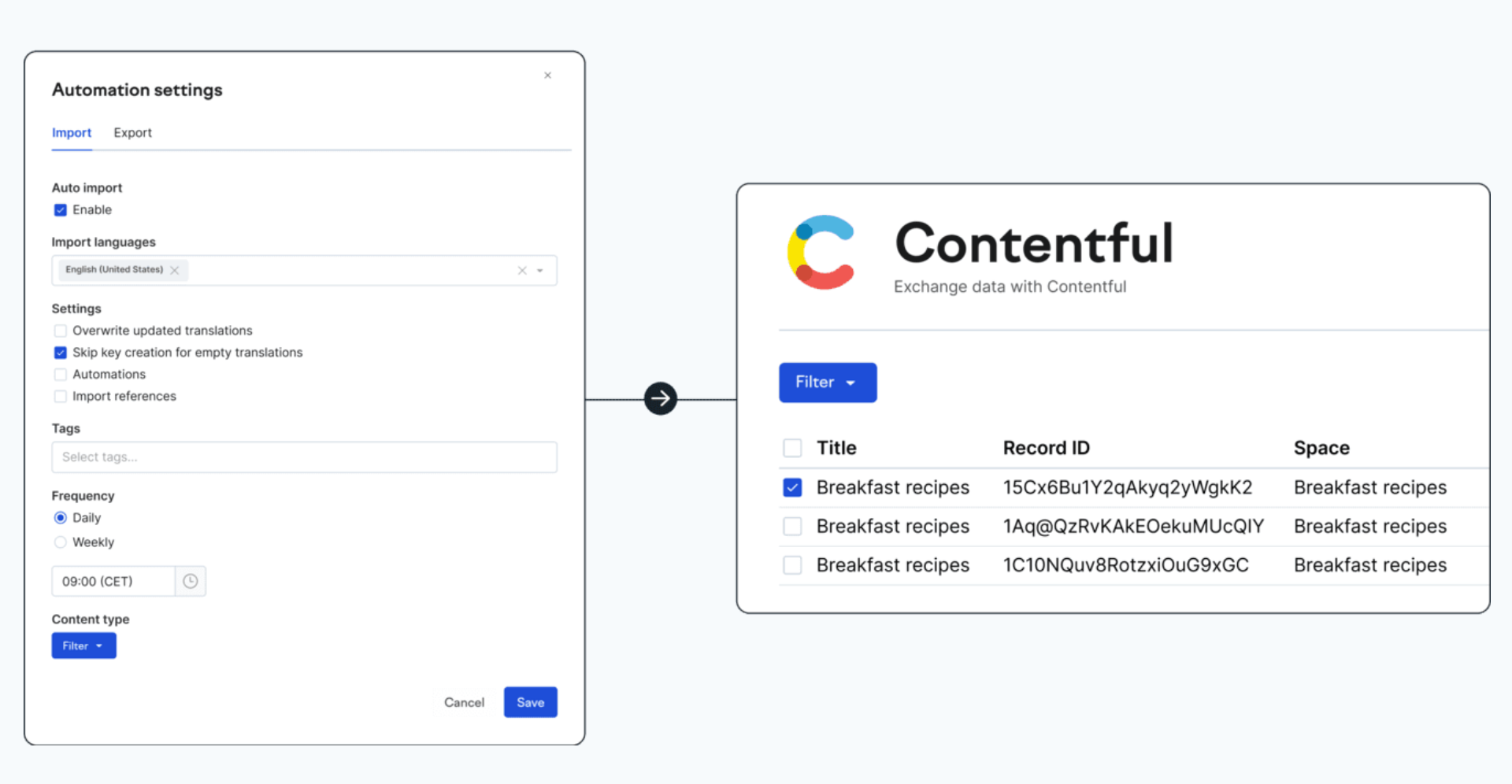
Contentful + Lokalise
Contentful is fast and reusable by design. Localization becomes the bottleneck when teams fall back on manual export/import loops.
The Contentful integration is meant to sync entries between Contentful and Lokalise, so translation work happens in a dedicated environment and returns to Contentful when it’s ready. With it, you can:
Translate Contentful entries without resorting to copy-pasting
Keep translation aligned with what’s actually in the CMS (because you’re syncing rather than emailing files around)
Translation requests and progress are easier to manage when the headless CMS localization tool like Lokalise becomes the system of record for localization work
💡 Good to know
There are two ways to run this integration:
1. Contentful Native app: Runs inside the Contentful editor. Good starting point if your content team wants to initiate translation from within Contentful.
2. “Lokalise-first” (standalone app): Centers localization work inside Lokalise, with Contentful as the connected content source. This often fits teams that want more of the localization workflow managed in one place.
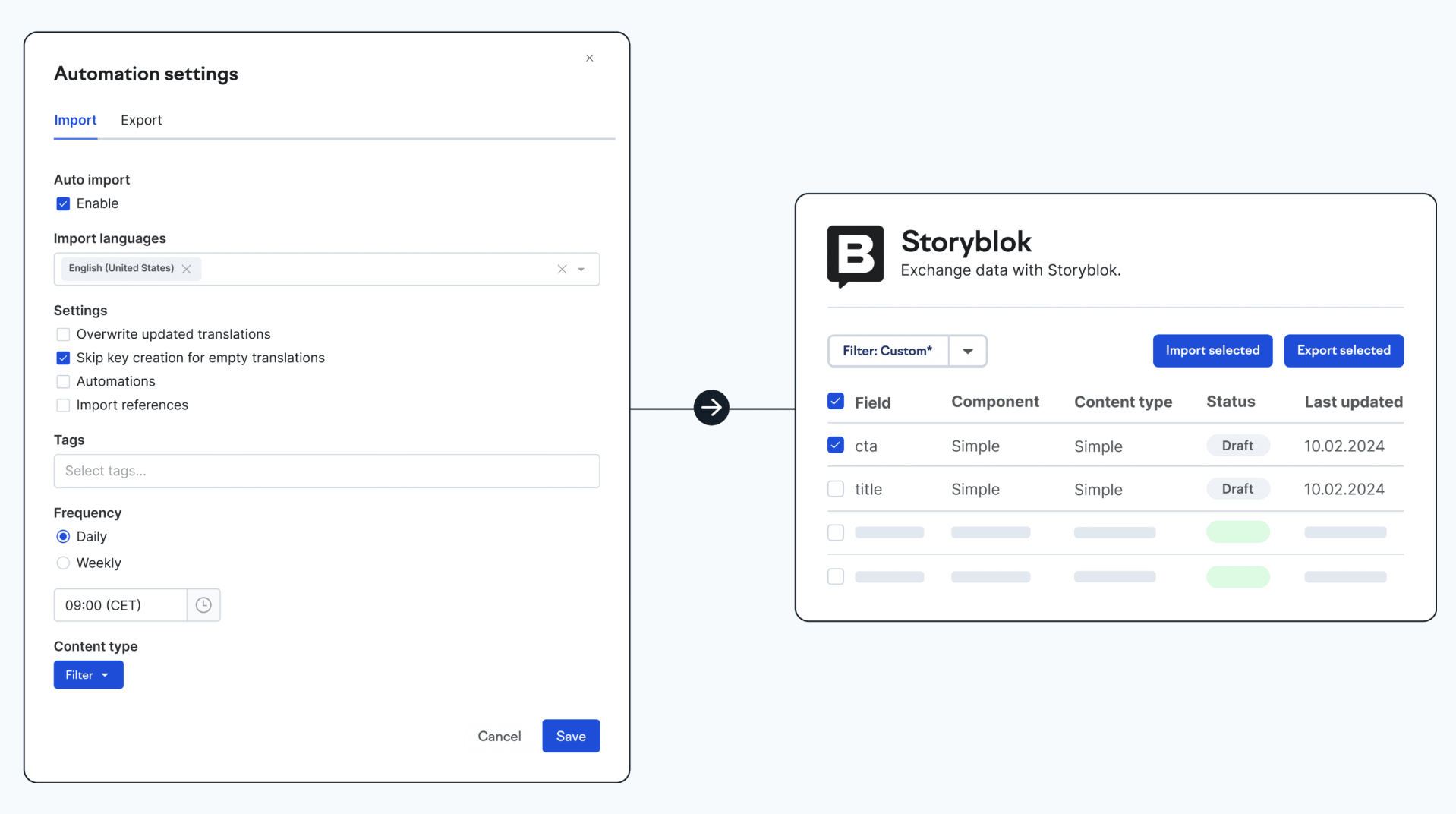
Storyblok + Lokalise
Storyblok is component-based, which is great for flexible page building but can get messy in localization if you’re moving content manually.
The Storyblok integration is there to keep localization repeatable and structured, so translated content lands back in the right place. With it, you can:
Translate nested blocks and reusable components without breaking the structure
Keep locales aligned and manage multiple languages across the same content model
Create/edit in Storyblok, translate/review in Lokalise, then publish back with fewer manual steps in between
WordPress + Lokalise
WordPress might not be your “headless core,” but it often powers blog/editorial or marketing content in modern stacks.
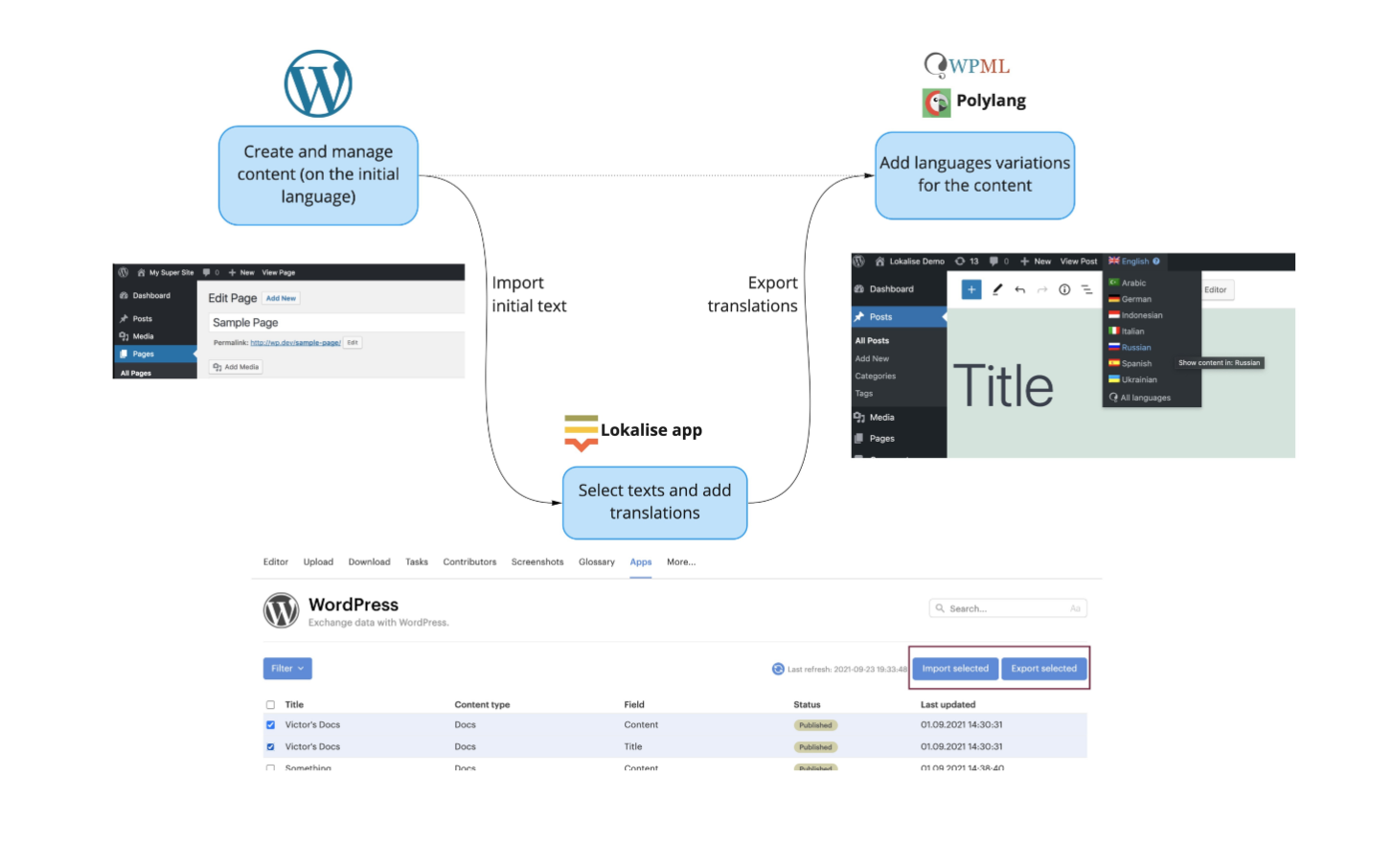
The Lokalise WordPress plugin is designed to import WordPress content into Lokalise and sync translations back, so multilingual publishing doesn’t turn into a separate process. It’s great for:
Keeping posts and pages in sync across languages without manual coordination
Reducing operational overhead with fewer handoffs between writers, translators, reviewers, and the final publish step
Achieving more stability as content grows since you can create a predictable loop (import content, then translate, then sync back)
Let’s take a closer look at this workflow as it’s applicable to most of the headless CMS localization tools.
Headless CMS translation workflow
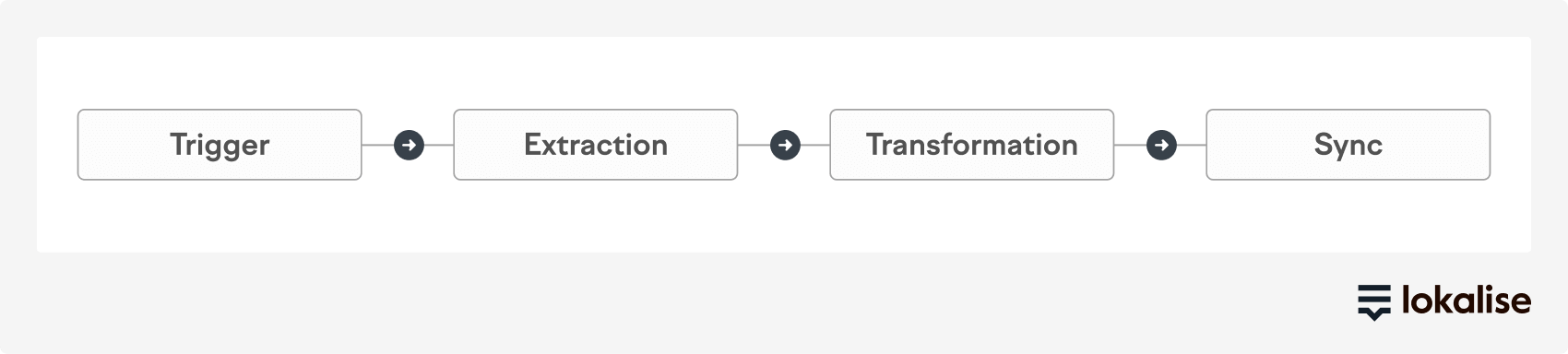
A hands-off headless workflow is just a closed loop: content changes in the CMS, translation happens in the translation management system, and approved translations return to the CMS automatically:
The same pattern works whether you’re using Contentful, Storyblok, or WordPress. When content changes, localization starts automatically. When translations are approved, they return automatically. Nobody is moving files around manually.
Trigger: Localization starts when content is ready
A good trigger is tied to a meaningful moment in your CMS workflow.
Most teams use “Publish”, “Republish”, or a clear stage like “Ready for translation.” That keeps translation aligned with real content. Translators work on what matters and content managers know what’s in motion.
Whether you’re in Contentful, Storyblok, or WordPress, the goal stays the same: when content is ready to ship, translation starts without a separate request.
Extraction: The CMS sends the right content, in the right shape
Once the trigger fires, the CMS needs to send content to Lokalise (or another headless CMS localization tool) in a way that still makes sense.
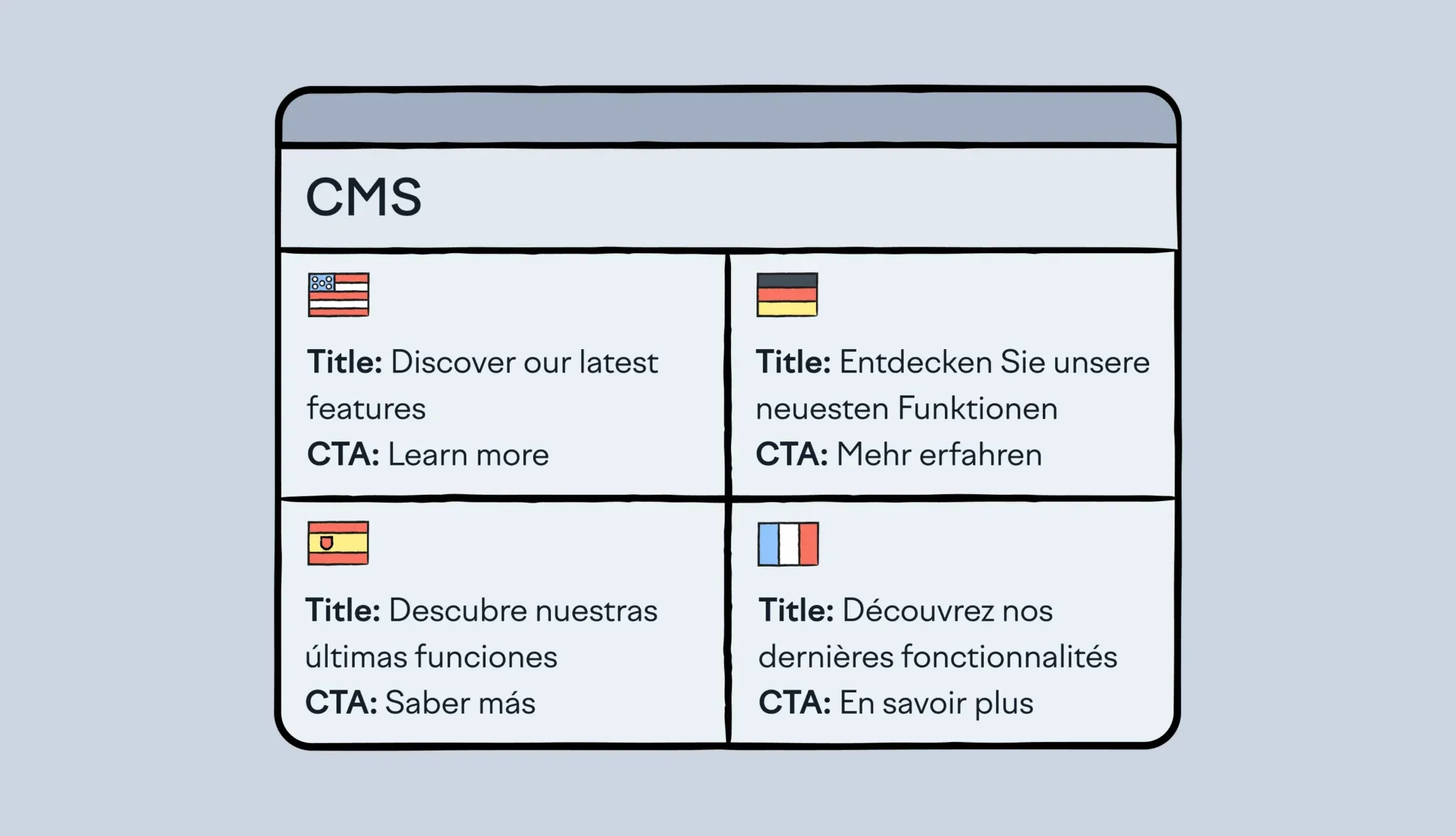
This step is easy to underestimate because headless content rarely lives in one big text field. It’s spread across titles, body copy, SEO metadata, and reusable blocks. A single “page” might include a hero section, a CTA, a testimonial module, and a referenced snippet pulled from another entry.
Clean extraction keeps that structure intact. It sends only what should be translated, and it keeps stable identifiers so translations always know where to return. This is exactly how you avoid the classic headless problem: translations are done, but nobody is sure which string belongs where.
Transformation: Make translation safe and consistent before it ships
Transformation is where the workflow becomes reliable at scale. It protects the things that break easily in headless stacks.
This is the moment you keep rich text and links from getting mangled:
You protect variables and placeholders so they don’t break layouts or functionality
You add the context translators need so they don’t guess what a string means
You apply consistency controls, so the same product term doesn’t show up three different ways across web, app, and docs
When transformation is doing its job, translation becomes a step within a smooth, repeatable localization process.
Sync: Approved translations return to the CMS automatically
Sync is the payoff. Once content is translated and approved in Lokalise, it flows back into your CMS in the correct locale fields. Your frontends pull the updated content like they always do, and you don’t have to deal with the manual handling of “final_final.xlsx” files.
The important detail here is the approval gate. The workflow only syncs content that’s ready. That keeps in-progress work from leaking into production and gives teams a clear signal for what’s shippable.
Main pillars of a headless CMS integration with a TMS
To feel truly hands-off, headless CMS integration with a TMS needs to do three jobs well: help teams manage content, process it safely for translation, and exchange it reliably between systems.
Content management
Content management is about control and visibility. Content teams and developers need to understand what’s in scope for translation, what’s already done, and what’s still in flight.
In practice, that means the integration should let you:
View and browse CMS content from within the integration experience
Choose what to import into the TMS (specific entries, content types, locales)
Choose what to export back to the CMS (usually approved translations only)
See translation status clearly so nobody has to guess what’s shippable
Get through installation and setup without turning it into a mini project
If this layer is weak, teams fall back to spreadsheets and Slack pings.
Content processing
This is the workhorse. Headless content is structured and modular, which is exactly why integrations need to be smart about how they prepare content for translation. A reliable integration should be able to:
Parse and flatten content structures so components and nested fields are handled cleanly
Segment content for translation context so translators don’t receive confusing fragments
Mark non-translatable content (IDs, system fields, code snippets, internal notes)
Reassemble translated content into the original structure so it lands back correctly
Count words accurately for planning and cost visibility
Deduplicate translation keys to reduce repeated work and keep language consistent
Detect the source language so content is routed correctly
Handle plurals and placeholders so UI strings and dynamic content don’t break
This is what prevents the common failure mode where translations end up being correct in isolation, but they are unusable once they return to the CMS.
Content exchange
Content exchange is about reliability. Even a great workflow breaks if content doesn’t move predictably between systems. At minimum, a good integration supports:
Bidirectional sync (push content to Lokalise, pull translations back)
Manual import/export triggers when teams want control (for example, a one-off batch)
Automatic sync on updates so localization stays current as content changes
Reliable transport with retry logic so failures don’t silently drop content on the floor
When content exchange is done right, the system keeps things moving automatically, so your team can focus on shipping.
How to version and manage dynamic content in a headless CMS localization flow
Headless content doesn’t sit still. You publish, update, tweak, republish. In a multilingual setup, that creates a new challenge: how do you keep translations aligned when the source content keeps changing?
This is where versioning and state management come into the picture. Without them, translators work on outdated strings, reviewers approve content that’s already changed, and teams end up shipping inconsistent experiences across locales.
Live vs. draft: keeping content states clear
In a headless CMS, content usually exists in at least two states: draft and live. Localization needs to respect that distinction. A reliable workflow ensures:
Only the right content gets translated (e.g. “Ready for translation” or “Published” states)
Translators don’t work on incomplete drafts unless explicitly intended
Live content always reflects approved translations, not in-progress work
In practice, this means tying localization triggers to meaningful CMS states. For example, translation might only start when content is marked as “ready” or published, not while it’s still being edited.
💡 Good to know
Lokalise workflows keep content states clear thanks to structured stages and status tracking, so teams always know whether a string is new, in progress, reviewed, or approved.
Workflows are there to define how translation tasks are created and processed. When new keys are added, workflows automatically generate translation and review tasks based on predefined steps. If content changes after that, automations can detect updates and trigger new tasks, while version control is handled separately through branching and project structure.
Snapshot-based versioning: translating the right version
One of the most common failure points in localization is version drift. Translators work on one version of a string, while the CMS moves on to another. The way to solve this is snapshot-based versioning. Instead of continuously pulling “whatever is latest,” a good workflow:
Captures a snapshot of content at the moment localization is triggered
Sends that fixed version to translation
Tracks changes separately if the source updates mid-cycle
This creates stability. Translators work on a consistent version, and teams can clearly see what changed after the snapshot.
💡 Good to know
In Lokalise, you can easily set up a workflow to manage versioning by organizing content into tasks and jobs tied to specific string states. If a source string changes, it’s flagged as needing re-translation, rather than overwriting work in progress, without anyone noticing.
Handling content changes between releases
Content changes don’t stop just because localization is in progress. The key is not to prevent changes, but to manage them explicitly. A well-structured workflow should:
Detect when source content changes after translation has started
Mark affected strings as “outdated” or “needs update”
Prevent outdated translations from being published accidentally
Allow teams to re-trigger translation only for changed content
This is where many manual workflows break. Without clear signals, teams either re-translate everything (slow and expensive), or miss updates (inconsistent and risky).
💡 Good to know
Lokalise workflows introduce clear status transitions and automation rules that handle this cleanly. When content changes:
The system flags impacted strings
Teams can reassign only what changed
Approval gates ensure only up-to-date translations are synced back
Approval gates: controlling what goes live
In a continuous localization setup, not everything should sync back to the CMS immediately. Approval gates act as a safeguard. This mean only reviewed and approved translations are pushed back, while draft or in-progress translations stay isolated.
That’s how your teams can confidently ship knowing content is complete. This is especially important when content updates frequently. Without approval control, it’s easy for partially translated or outdated strings to leak into production.
Make continuous localization your default
Headless architecture is meant to remove bottlenecks. Localization should follow the same rule.
When you connect your CMS and your TMS into one continuous loop, global releases stop depending on manual handoffs. Content stays structured, terminology consistent, and every locale stays aligned as your content changes.
If you want to see what this looks like with your own content, try Lokalise.
Set up an integration with your CMS, run a small pilot (one content type, a few locales), and you’ll quickly see where the manual steps disappear.
FAQs on headless CMS localization
Is there a Strapi Lokalise integration?
There isn’t a dedicated “click-to-install” Strapi plugin in Lokalise like there is for Contentful, Storyblok, or WordPress. Most teams integrate Strapi + Lokalise using Strapi webhooks and the Lokalise API/webhooks, or an automation layer (for example, n8n) to connect the two systems.
What are Strapi i18n tools?
Strapi i18n tools are Strapi’s internationalization features for creating and managing localized versions of the same content across different locales. They define how localized entries are stored and delivered via the API, which is what a TMS workflow syncs into.
What is API-first localization?
API-first localization means content moves between your CMS and TMS through APIs and events (like webhooks), not manual file exports and imports. It’s the model that makes “hands-off” workflows possible because updates can trigger translation automatically and return translations automatically.
What are automated content pipelines for localization?
Automated content pipelines are repeatable flows that push content to translation and pull approved translations back without manual coordination. In practice, that usually means CMS events (webhooks) trigger the pipeline, and the TMS sends status updates back so teams can ship confidently across locales.
Mia has 13+ years of experience in content & growth marketing in B2B SaaS. During her career, she has carried out brand awareness campaigns, led product launches and industry-specific campaigns, and conducted and documented demand generation experiments. She spent years working in the localization and translation industry.
In 2021 & 2024, Mia was selected as one of the judges for the INMA Global Media Awards thanks to her experience in native advertising. She also works as a mentor on GrowthMentor, a learning platform that gathers the world's top 3% of startup and marketing mentors.
Earning a Master's Degree in Comparative Literature helped Mia understand stories and humans better, think unconventionally, and become a really good, one-of-a-kind marketer. In her free time, she loves studying art, reading, travelling, and writing. She is currently finding her way in the EdTech industry.
Mia’s work has been published on Adweek, Forbes, The Next Web, What's New in Publishing, Publishing Executive, State of Digital Publishing, Instrumentl, Netokracija, Lokalise, Pleo.io, and other websites.
Mia has 13+ years of experience in content & growth marketing in B2B SaaS. During her career, she has carried out brand awareness campaigns, led product launches and industry-specific campaigns, and conducted and documented demand generation experiments. She spent years working in the localization and translation industry.
In 2021 & 2024, Mia was selected as one of the judges for the INMA Global Media Awards thanks to her experience in native advertising. She also works as a mentor on GrowthMentor, a learning platform that gathers the world's top 3% of startup and marketing mentors.
Earning a Master's Degree in Comparative Literature helped Mia understand stories and humans better, think unconventionally, and become a really good, one-of-a-kind marketer. In her free time, she loves studying art, reading, travelling, and writing. She is currently finding her way in the EdTech industry.
Mia’s work has been published on Adweek, Forbes, The Next Web, What's New in Publishing, Publishing Executive, State of Digital Publishing, Instrumentl, Netokracija, Lokalise, Pleo.io, and other websites.
Top Things to Know: What is CMS Localization? Content Management System (CMS) localization—also known as CMS internationalization, or CMS translation—consists of configuring your CMS to open your content to different…
Read more CMS Localization for Your Business: a Guide
7 Content Localization Tactics to Win Over Your Audience [+ Free Template]
A potential customer in Tokyo sees your clever slogan. But it’s written in English for an Australian audience and makes zero sense to a Japanese person. The buyer — puzzled and unimpressed — browses your website for a few seconds before closing the tab. Another sale that slipped away from your hands. The culprit? Lack of content localization. Localized content means you speak your buyers’ language — whether that’s Chinese, Russian, Spanish, or something
Read more 7 Content Localization Tactics to Win Over Your Audience [+ Free Template]
8 Reasons Why Website Localization is Important (+ Examples)
Imagine walking into a store and asking a salesperson for help. But they start talking in a language you don’t understand. You cluelessly try to gesture with your hands, speak slowly in English, and pray that they somehow understand you. But nothing works, and you walk out of the store disappointed. That’s a lot like what your potential customers feel when your business website isn’t localized for their market. They’re confused and frustrated, ultima
Read more 8 Reasons Why Website Localization is Important (+ Examples)
Case studies
Behind the scenes of localization with one of Europe’s leading digital health providers