


Localization Best Practices

How to implement continuous localization in your CI/CD workflow

Emils Veveris,Updated on May 15, 2026·12 min read
Continuous_localization

What if your translations updated the moment your code changed?

Continuous localization is a DevOps-aligned workflow where translation is integrated into the software development lifecycle (SDLC). Unlike traditional waterfall methods, it automates the synchronization between code repositories and translation platforms, so global content updates in real time as new code is pushed to production.

This removes translation latency, keeps context intact, and ensures every market sees the same product at the same time.
This shift isn’t optional anymore. Continuous localization is the operational standard for teams building across web, mobile, and AI products. Let’s see how it works and how your team can benefit from it.
 

🧠 Continuous localization guide, written in collaboration with localization engineers

At Lokalise, we want to give you actionable and truly useful guides that empower you to make positive change, which is why we collaborate with localization engineers to give you the most accurate information.

In this article, you’ll learn what continuous localization is, how it automates the translation loop, how it connects to CI/CD pipelines, and how to implement it without slowing down releases.
 

What is continuous localization?

Continuous localization is a DevOps-aligned workflow where translation is integrated into the software development lifecycle and updated automatically as code changes.

Instead of treating localization as a separate step, it becomes part of how software is built, tested, and shipped. Content moves with the code, not after it.

At its core, continuous localization automates the translation loop:

  • New string keys are created during development
  • Changes are automatically detected in the code repository
  • Content is sent to the translation management system
  • Translations are completed in parallel with development
  • Localized content is synced back into the codebase

This loop runs continuously, without manual handoffs or release delays.

CI/CD pipelines trigger localization sync. Each commit, pull request, or release event can automatically initiate localization workflows. Translation becomes event-driven, just like testing and deployment.

How does continuous localization differ from waterfall translation?

The difference between waterfall and continuous localization comes down to timing, automation, and how teams work together.

In waterfall localization, translation happens after development is complete.

In continuous localization, translation runs alongside development in real time.

Here’s the waterfall localization vs. continuous localization comparison below:

AspectWaterfall localizationContinuous localization
TimingAfter development is finishedRuns alongside development
WorkflowProject-based, large batches of updatesContinuous, small updates
ProcessManual file handoffsAutomated sync between systems
ReleasesDelayed until translation is doneAlways ready for release
ContextOften lost across filesPreserved through string-level updates
CollaborationSequential (devs hand it to translation teams, and then it localized content gets released)Parallel (dev, translation, and product work simultaneously)

Waterfall localization creates translation latency. Teams wait for development to finish, send large files for translation, and pause releases until everything is ready. This slows down time to market and increases the risk of inconsistencies across languages.

Continuous localization removes that bottleneck. Instead of working in phases, teams operate in a shared, continuous workflow. Developers push updates, localization runs automatically, and content stays aligned with production at all times.

This shift mirrors the move from waterfall to Agile and DevOps in software development. Localization is no longer a final step and it’s not treated as an afterthought. 

And what about agile localization? Agile localization improves translation latency by introducing translation earlier in the process. Teams translate smaller batches of content during development sprints, which reduces delays.

However, localization is still tied to sprint cycles, and coordination between teams is still required. Here’s the best way to understand the difference between the three:

  • Waterfall localization happens after development is complete
  • Agile localization introduces translation during development, typically in sprints
  • Continuous localization removes phases entirely and runs translation in real time alongside development

📚 Further reading

Learn more about agile localization and its pros and cons.

What are the core components of a continuous localization workflow?

A continuous localization workflow consists of a source code repository, string keys, a localization platform (TMS), an automation layer, a CI/CD pipeline, and cross-functional collaboration between teams.

These components work together to keep content aligned with code at every stage of development.

Source code repository

The workflow starts in the codebase.

Developers create and update string keys directly in repositories like GitHub, GitLab, and Bitbucket. Every change is tracked through commits and pull requests, making content version-controlled from the start.

String keys

Content is structured as string keys. It’s not static text. Each string is tied to a specific UI element, feature, or user flow. This makes content modular, easier to update and translate without losing context.

Localization platform (TMS)

A translation management system (TMS) manages the translation loop. It receives new or updated strings automatically, provides context for translators, and ensures consistency through translation memory, glossaries, and quality checks.

Automation layer

Automation connects the repository and the localization platform. When changes are detected, content is pushed for translation. When translations are complete, they are synced back into the codebase. There is no need for manual file handling and there are no delays. This is how continuous localization automates the translation loop.

CI/CD pipeline

CI/CD pipelines trigger localization sync. Each commit, pull request, or release event can initiate localization workflows, ensuring that translated content is always aligned with production and ready to ship.

Cross-functional collaboration

Continuous localization requires teams to work in parallel. Developers, translators, product managers, and designers collaborate within the same workflow, often coordinated through tools like Jira. There are no handoffs between teams. The release process is under shared ownership.

Together, these components eliminate translation latency and preserve context across web, mobile, and AI products.

How do I integrate localization into a CI/CD pipeline?

You integrate localization into a CI/CD pipeline by automating how content moves from your codebase to translation and back, so every release is localized by default.

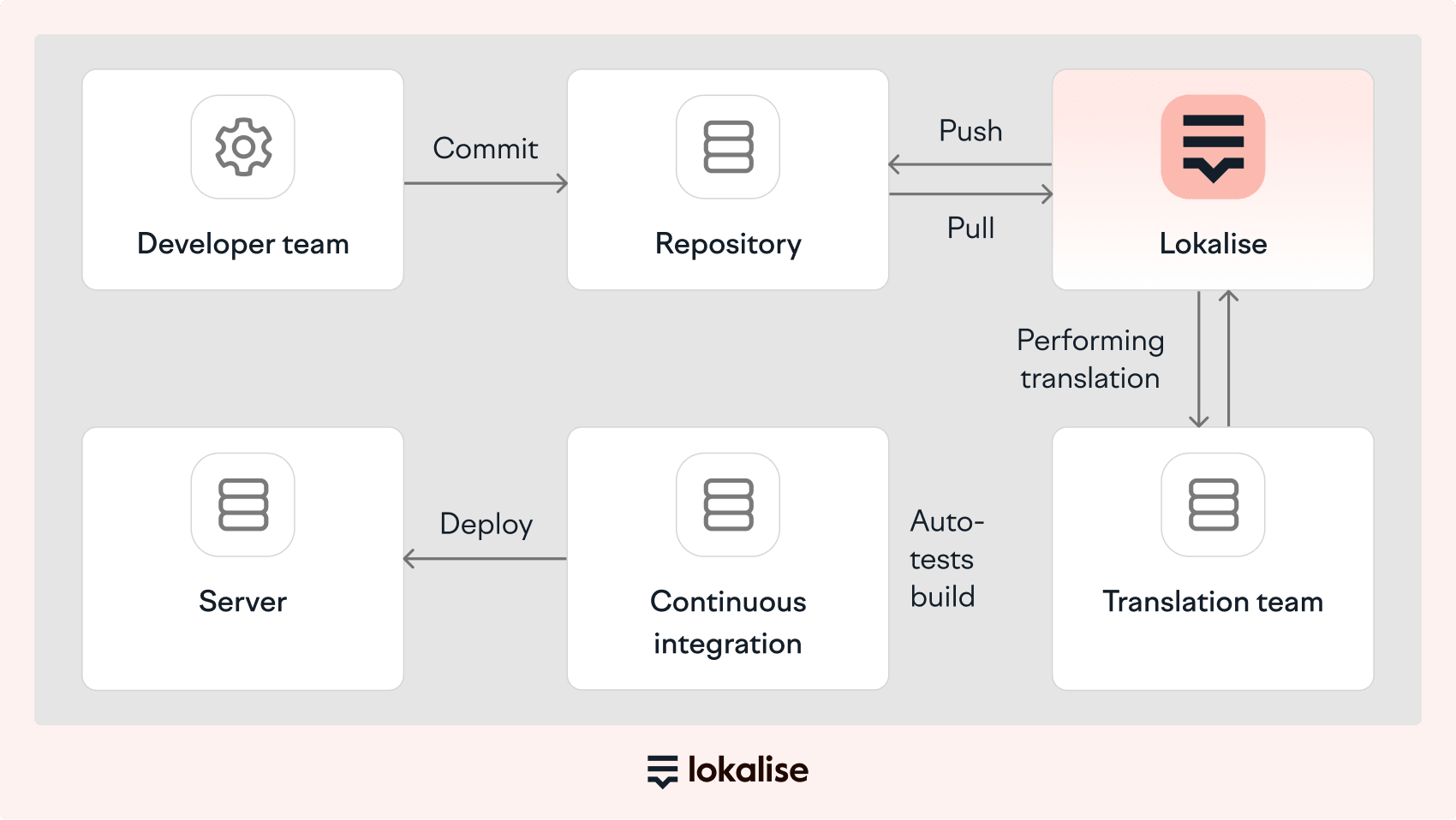
This removes manual work, eliminates translation latency, and ensures content stays in sync with production. Done right, the workflow would look something like this:

continuous localization process

Here are the exact steps to integrate localization into a CI/CD pipeline:

  1. Store content as string keys in your codebase
  2. Connect your repository to a localization platform like Lokalise
  3. Trigger localization on CI/CD events (commits, pull requests, merges)
  4. Translate content in parallel with development
  5. Sync translations back into the codebase automatically
  6. Validate translations during build and testing (CI stage)
  7. Release fully localized updates with every deployment


1. Store content as string keys in your codebase

The first step is to store all user-facing content as string keys in your codebase instead of hardcoding text directly into the interface.
A string key is a structured identifier for a piece of content, such as:

  • Button labels
  • Error messages
  • Onboarding prompts
  • Navigation items

Instead of embedding final text, developers reference the key and pull the correct language version dynamically.

This matters because string keys make content:

  • Version-controlled alongside code
  • Easy to update without breaking the UI
  • Traceable across features and releases

Developers manage these keys in code repositories where changes are tracked through commits and pull requests.

2. Connect your repository to a localization platform

Once content lives in the codebase as string keys, the next step is to connect your repository to a localization platform.

This integration creates a direct bridge between development and translation.

When developers update content:

  • New strings are automatically detected
  • Existing strings are updated in place
  • Content is pushed for translation without manual export

This removes the need for spreadsheets, file exports and imports, and manual coordination between teams. It enables your translators to always work on the latest version of the content, while developers no longer need to manage localization as a separate task.

3. Trigger localization on CI/CD events

Localization workflows should be triggered by CI/CD events so translation becomes part of your delivery pipeline.

Typical triggers include:

  • Commits
  • Pull requests
  • Merges to main branches
  • Release builds

Each event can initiate localization sync, ensuring content updates as soon as code changes. This shifts localization from a scheduled task to an event-driven process. It goes from a manual step to an automated system.

4. Translate content in parallel with development

Translation should happen in parallel with development, not after it.

As soon as new strings appear in the system, translators can begin working on them. This reduces delays and keeps releases on track. To maintain quality at speed, translators rely on:

This prevents inconsistent translations and last-minute rework before release. You get to move faster, but not at the expense of translation quality.

5. Sync translations back into the codebase automatically

Once translations are complete, they should be synced back into the codebase automatically. This eliminates manual steps like:

  • Uploading translated files
  • Converting formats
  • Copy-pasting content between systems

Automatic sync ensures that translations are always up to date and content is immediately available for testing. There is no mismatch between source and localized versions.

6. Validate translations during build and testing (CI stage)

It’s important to validate translations as part of your CI pipeline. This is how you’ll make sure that the localized content is complete, functional, and production-ready before deployment.

At this stage, localization is treated like code. It goes through the same validation process as any other part of the system.

This typically includes:

  • Completeness checks: Ensure all required string keys have translations for target languages. Prevent deployments with missing or fallback content.
  • Formatting and placeholder validation: Verify that variables, placeholders, and formatting are preserved correctly across languages.
  • Length and UI constraints: Detect layout issues caused by longer translations, such as text overflow, truncation, or broken components.
  • Automated tests and snapshots: Run UI or snapshot tests across languages to catch visual or functional issues early.
  • Build-time validation rules: Optionally block builds or flag warnings if critical translations are missing or inconsistent.

This is how you can ensure that all translations are aligned with the exact version of the code being released. Errors are caught before deployment and so, your localization meets the same quality standards as the rest of the product.

Without validation, teams risk shipping incomplete or broken localized experiences. With it, localization becomes a reliable part of the release pipeline.
 

📚 Further reading

Want to learn more? Read our complete guide on localization testing that shares a real-life example of a sample project.
 

7. Release fully localized updates with every deployment

The final step is to release localized content alongside every product update. When you adopt continuous localization, every deployment includes:

  • Up-to-date translations
  • Consistent content across languages
  • A complete product experience for all users

Localization becomes part of the delivery system.

What is the role of the developer in continuous localization?

The developer’s role in continuous localization is to structure content, integrate localization into the codebase, and automate how it moves through the delivery pipeline.

Instead of managing translation manually, developers design the system that allows localization to run continuously alongside development. Their work determines whether localization becomes a bottleneck or a seamless part of delivery.
 

📚 Further reading

Discover what are the biggest localization issues developers face and how to solve them.

Structuring content for localization

Developers define how content is created, stored, and referenced in the codebase.

This includes:

Using string keys instead of hardcoded text
Grouping strings by feature, screen, or user flow
Naming keys in a way that provides meaning and context

Well-structured content reduces ambiguity for translators and makes updates safer and faster. It also enables automation. Without structured content, there is nothing for the system to detect or sync.

Integrating localization into the development workflow

Developers connect the codebase to the localization platform. This means setting up integrations with repositories like GitHub, GitLab, or Bitbucket so that:

  • New strings are detected automatically
  • Updates are pushed for translation without manual work
  • Translations are synced back into the codebase

This removes file-based workflows and manual coordination.

Defining CI/CD triggers for localization

Developers define how localization is triggered within the CI/CD pipeline.
This typically includes:

  • Detecting new or updated strings in pull requests
  • Triggering sync on merges to main branches
  • Validating that required translations are available before release

These triggers make localization event-driven. Instead of waiting for someone to initiate translation, the system responds automatically to development activity.

Maintaining context

Developers play a key role in preserving context, which directly impacts translation quality. They support this by:

  • Linking strings to UI components or screens
  • Providing screenshots or interface previews
  • Adding descriptions for ambiguous or reused strings
  • Handling edge cases like pluralization, variables, and formatting

Better context leads to fewer errors, more consistent translations, and less rework across releases.

📚 Further reading

Are you using AI in your localization workflow? If not, you’re missing out. Learn more about how you can properly feed AI with context to lower translation costs and move faster.

Supporting version control and release consistency

Developers make sure that localized content follows the same versioning logic as code. This includes:

  • Keeping translations aligned with specific releases or branches
  • Avoiding mismatches between source and localized versions
  • Ensuring rollback scenarios include correct translations

This prevents issues like incomplete releases, outdated content, and translation inconsistencies.

Removing bottlenecks from the localization workflow

Developers eliminate the manual steps that slow localization down. This includes:

  • Replacing file-based workflows with automated sync
  • Reducing dependencies between teams
  • Ensuring localization does not block releases

The goal is to keep content moving at the same speed as code.

❗ Important note

Just like in any other model, in continuous localization, developers are not responsible for translation. They are responsible for the system that makes translation continuous, automated, and scalable.

What are the business benefits of continuous localization?

Continuous localization improves speed, reduces total translation costs, and ensures a consistent product experience across all markets by embedding localization directly into the delivery pipeline.

This helps teams remove the bottlenecks that typically delay releases and increase operational overhead.

Faster time to market

Continuous localization removes the delay between development and translation. Content is translated as soon as it is created, which allows teams to release features globally without waiting for localization to catch up. This is especially important in fast-moving environments where updates happen daily or multiple times per day.

In practice, this means teams can:

  • Release features simultaneously across all markets
  • Avoid holding back deployments due to missing translations
  • Iterate faster based on real user feedback

Time to market is no longer constrained by localization readiness. It becomes aligned with development speed.

Lower total translation costs

Continuous localization reduces total translation costs by increasing automation and reducing the amount of human effort required per word. If you add AI orchestration to the mix, the savings can be quite significant.

According to Lokalise’s internal cost model, traditional human translation costs around $150,000 per 1M words. More automated workflows reduce that cost significantly. For example:

  • Human translation: $150,000 (100% baseline)
  • Standard AI + human review: ~$53,750 (~36%)
  • Pro AI + scoring + human review: ~$23,750 (~16%)
  • Pro AI + RAG without human review: ~$5,000 (~3%)

These reductions are driven by higher pre-translation quality (which reduces the need for edits) and fewer words requiring human review due to scoring and filtering. Plus, you don’t need to manually handle tasks like file handling and coordination. It’s all automated.

📚 Further reading

Learn how you can cut translation costs by up to 97% by using AI and a human in the loop.

Consistent user experience across markets

Continuous localization ensures that all users see a complete and consistent product, regardless of language. Without it, teams often release fully updated content in one language, but then partially translated or outdated content in others.

With continuous localization:

  • Content updates are synchronized across all languages
  • Context is preserved across features and releases
  • Users in every market experience the product at the same level of quality

This becomes even more critical in multi-platform environments where users interact with web, mobile, and AI interfaces simultaneously.

Reduced operational overhead

Continuous localization removes the need for manual coordination between teams. Traditional workflows rely on exporting and importing files, tracking translation progress across tools, and then coordinating release timing between developers and translators

Continuous localization replaces this with automation and shared workflows. As a result, developers do not need to manage translation logistics and translators always work on the latest content.

Better scalability across products and platforms

Modern teams manage content across multiple systems and touchpoints. This includes:

  • Web applications
  • Mobile apps
  • Marketing websites
  • Help centers and documentation
  • AI-driven interfaces

Continuous localization makes it possible to manage this complexity without introducing delays or inconsistencies. As content volume grows, the system scales because:

  • Content is modular (string-based)
  • Workflows are automated
  • Updates are triggered by development events

This is exactly how you can expand to new markets faster, without increasing operational friction.

How do you choose a continuous localization tool?

To choose a continuous localization tool, look for a platform that integrates with your development workflow, automates the translation loop, and scales with your product.

Bear in mind that not all localization tools support continuous localization. Many still rely on manual workflows that break the connection between development and translation.

CapabilityWhat it should doWhy it matters
Integration with development stackConnect to GitHub, GitLab, Bitbucket and support pull request workflowKeeps localization aligned with code changes and eliminates manual handoffs
Automation of the translation loopAutomatically push strings for translation and sync them backRemoves delays and ensures continuous updates
Context for translatorsProvide screenshots, metadata, and translation memoryImproves translation quality and reduces rework
Workflow flexibilityAllow triggers on commits, pull requests, and releasesAdapts to your CI/CD pipeline instead of forcing rigid processes
Multi-source supportHandle content from code, CMS, design tools like Figma, and support systemsKeeps content consistent across all platforms
ScalabilitySupport large volumes of string keys, languages, and teamsPrevents performance issues as your product grows
Built-in QA and validationDetect missing translations and validate formatting and placeholdersEnsures quality before deployment

Lokalise brings all of these capabilities into one platform, giving teams a system that works at both developer speed and enterprise scale.

Companies like GoCrypto, Elli, and Withings already run continuous localization workflows on Lokalise, with clear, measurable impact on speed, cost, and operational efficiency.

For example:

  • Withings reduced localization management time from 10 hours to 1 hour per feature, achieved 90% faster rollout of localized features, and cut overall localization effort by 50%
  • GoCrypto added 7 new languages in 6 months, scaling to 11 languages across 13 markets while supporting continuous product and market expansion
  • Elli reduced time to market for new languages from months to weeks while supporting releases across 20+ languages

This is what enterprise-ready localization looks like in practice. It’s about having a reliable system that supports continuous, cross-functional workflows across product, design, and content teams at scale.

If you want to see how this works in practice, you can start a free trial and set up your first continuous localization workflow in minutes.


Localization Best Practices

Author

emils.png

Digital Growth Lead

Emils is Head of Digital Growth at Lokalise. He enjoys developing growth marketing strategies that deliver results, reading books, getting better at surfing and Italian food.

Travel Far. Feel Alive translated in Japanese

8 software localization issues that could hurt your business, and how to avoid them

The localization process is not easy. You do not necessarily know all the languages you want to expand your product into, so you have to trust your teams that your international offer is solid and relevant. When localizing your software, there are a number of issues and challenges that are—unfortunately—almost inevitable. However, they are fixable. Discover in this article eight software localization issues, how they could harm your business, and what to do to overcome them.

Read more 8 software localization issues that could hurt your business, and how to avoid them

Lokalise illustration for localization issues

The 9 biggest localization issues/problems developers face and how to solve them

Implementing a proper localization workflow can be quite the complex task, especially when you have never done it before. There are numerous things for you to consider and keep in mind. In this article, we will discuss some of the most common localization issues/problems that we, as developers, face and how to solve them with the help of the Lokalise TMS (translation management system). The concepts presented in this articl

Read more The 9 biggest localization issues/problems developers face and how to solve them

Lokalise illustration of Growth Heroes for app developers

How innovative app developers are using localization to grow their business

For most app developers, the focus is on building. The joy is in taking an idea and bringing it to life. The app store listing can be a moment of delight tinged with sadness, a mother watching a child, suitcases packed, phone in hand, laces untied, heading off to university. But both underestimate the joy that can be found after a milestone has been reached. For app developers, the real excitement starts as you try to get your beloved creation into the hands of as many users as possible, so t

Read more How innovative app developers are using localization to grow their business

Stop wasting time with manual localization tasks.

Launch global products days from now.

  • Lokalise_Arduino_logo_28732514bb (1).svg
  • mastercard_logo2.svg
  • 1273-Starbucks_logo.svg
  • 1277_Withings_logo_826d84320d (1).svg
  • Revolut_logo2.svg
  • hyuindai_logo2.svg