
Lokalog
Discover what’s new at Lokalise with our latest product releases – empowering your localization journey one update at a time
November 3, 2026
Save Machine Translation into Translation Memory in Tasks and the API
🌟 What's new?
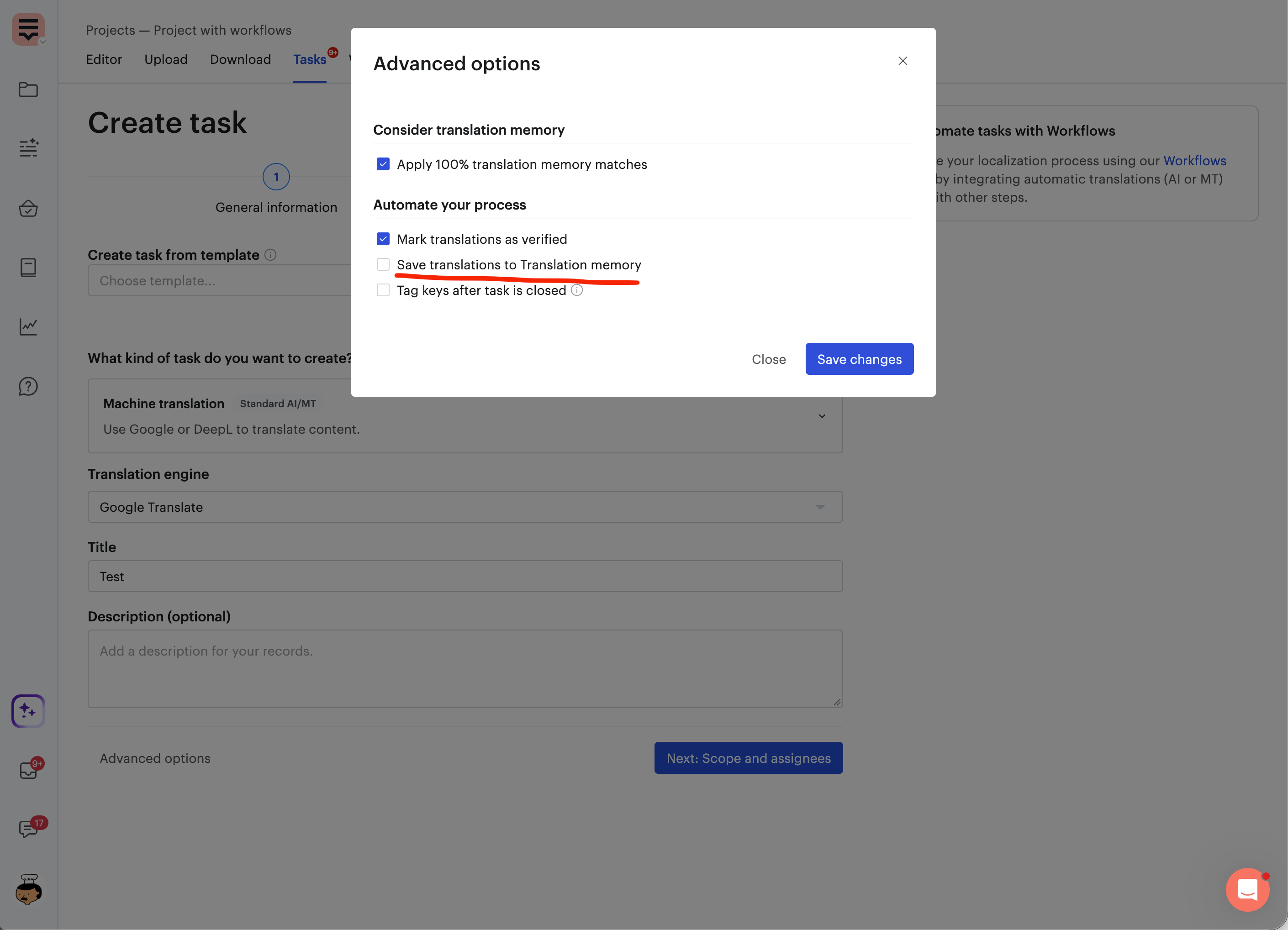
You can now save Machine Translation straight into your Translation Memory when you work with Tasks and through the public API. Until now, this was only possible in Workflows.
- Available in Tasks. Turn on the option when you set up a task, and your machine translations are added to your Translation Memory.
- Available in the API. The same option works through the public API, so your integrations can use it too.
The setting is off by default for manually created tasks. Once you save it, Lokalise remembers it, like your other advanced task settings.
🎯 Why it matters to you?
Machine Translation is a cost-effective choice in many situations. Now you can reuse those translations in your Translation Memory without having to set up a workflow first, which gives you more flexibility.
November 3, 2026
Analytics has new Workflows and Automations dashboards
🌟 What's new?
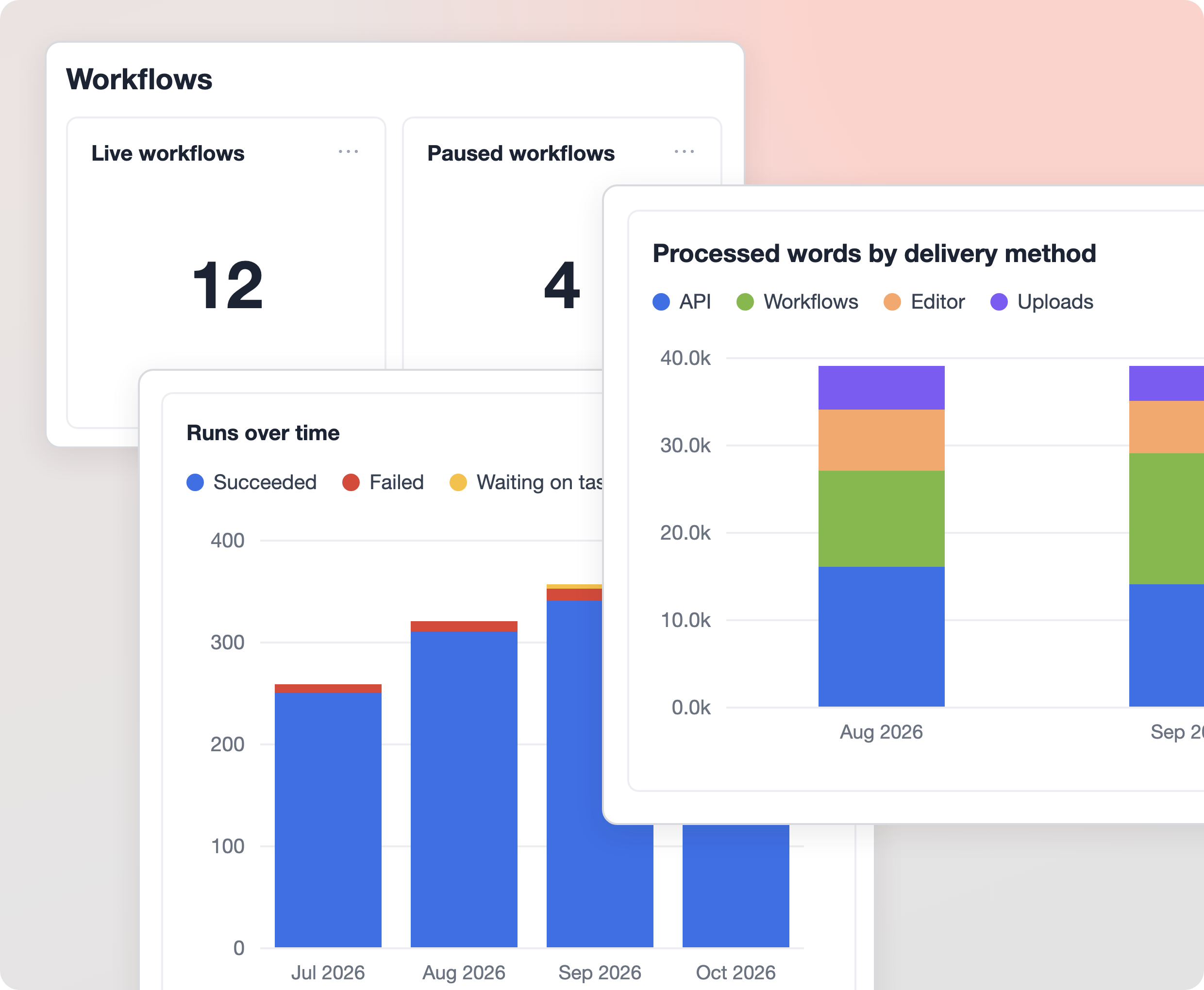
Two new dashboards on the Usage tab of Analytics give you a full view of how your Workflows and Automations run and what they deliver.
- Workflows at a glance. See which workflows are live, paused or canceled, plus a "Workflows needing action" list that explains why each one stopped and how to fix it.
- Run health. Track runs over time, including succeeded, failed and waiting-on-task runs, along with your success rate. You can also spot workflows that are live but have been idle for 30 days.
- Workflow results. Measure keys touched, tasks created and completed, and processed words, and compare them with other ways of delivering words, like the editor, file uploads, the API and manual tasks.
The Automations dashboard shows what's configured versus purchased and which projects use automations. It also shows how they changed over time, the action chain behind each one (Translation Memory, Machine Translation, Pro AI) and what they delivered, from keys touched to processed words.
🎯 Why it matters to you?
Workflows and Automations do a lot of work behind the scenes. Now you can answer "Are they running? Are they stuck? What are they delivering?" yourself, without a support ticket or a custom report. Catch broken or idle workflows early, check you're getting value from the automations you pay for, and see how much of your translation volume runs on autopilot.
October 30, 2026
The Vantage API now has an official Ruby SDK
🌟 What's new?
Ruby developers can now work with the Lokalise Vantage API through Ruby SDK Next, our new official Ruby client.
- Vantage client. Create a Vantage client with your access key and call Vantage resources directly.
- Short, readable code. For example, listing your team's projects takes just a few lines.
- Documentation. The SDK has its own documentation site to help you get started.
The Vantage API is in beta, so some changes may happen as it evolves.
🎯 Why it matters to you?
If you build with Ruby, you can connect Vantage to your own tools and workflows without writing the API requests by hand. It saves setup time and gets you started faster.
October 23, 2026
The official Node.js SDK now supports the Vantage API
🌟 What's new?
Our official Node.js SDK now supports the Lokalise Vantage API, starting with version 17.
- Vantage client. A dedicated
LokaliseApiVantageclient gives you direct access to the Vantage endpoints. - Same familiar style. Use your Lokalise API key and call Vantage resources, such as listing your projects, in a few lines of code.
- Documentation. The SDK docs include a Vantage introduction to get you started.
The Vantage API is in beta, so some changes may happen as it evolves.
🎯 Why it matters to you?
If you build with Node.js, you can plug Vantage into your own tools and workflows without writing the API requests by hand. It saves setup time and gets you started faster.
October 21, 2026
More reliable syncing with updated Lokalise GitHub Actions
🌟 What's new?
We've released new versions of our GitHub Actions, the ones that sync translation files between your GitHub repository and Lokalise: Push Action v5.7.0 and Pull Action v6.0.0.
- Improved reliability and stability for your automated translation workflows.
- Better handling of translation files and Git operations.
- More predictable synchronization between GitHub and Lokalise.
- Improved error handling, plus fixes for several edge cases.
Heads-up: Pull Action v6.0.0 includes breaking changes. Check the release notes before upgrading.
🎯 Why it matters to you?
Your translation pipeline runs more smoothly, with fewer surprises when files move between GitHub and Lokalise. Developers spend less time debugging sync issues and more time shipping.
October 21, 2026
Review Webflow translations in the real page with Live Preview
🌟 What's new?
Webflow Live Preview is now available in Vantage. Your reviewers can see translated content on the actual rendered page, instead of reviewing text in isolation.
- Quick setup. Sign in to your Webflow account and connect your project. There's no plugin, code snippet, or change to your site.
- Review on the real page. Once content is published to your Webflow review environment, reviewers open the rendered page and see where each translated segment appears.
- Segments highlighted. The relevant segments are highlighted in the preview, so reviewers know exactly what they're checking.
The preview is read-only for now, and we're building on it.
🎯 Why it matters to you?
Reviewers can check translations in the context of the final page, without switching back and forth between Lokalise and Webflow. That makes it easier to catch issues with fit, tone, and layout before you go live.
October 16, 2026
Pro AI translations now follow your style guide and your examples
🌟 What's new?
Pro AI translation in Expert now uses your team's style guide together with your translation examples (translation memory matches, reviewed or tagged keys). Before, it used one or the other.
- Your preferences shape every translation. Tone, formatting, and wording rules from your style guide now apply to every Pro AI translation.
- No setup needed. Existing style guides are picked up automatically.
- Pro AI only.
🎯 Why it matters to you?
Your investment in a style guide now counts in every AI translation. It helps most when the system can't find close examples from your past translations. Keep your style guide summary clear and concise for the best results.
October 16, 2026
The Vantage public API is here
🌟 What's new?
You can now automate Lokalise Vantage with the first version of its public API. It uses the same API access key you already use with the Expert API.
- Create projects and upload files for translation.
- Check translation status.
- More to come. Advanced features such as translation memory, glossary, and reviews will be added to the public API later.
The API is in beta, so some changes may happen as it evolves.
🎯 Why it matters to you?
You can plug Vantage into your own tools and workflows without manual steps. Developers can start building today with the documentation.
October 12, 2026
One place to manage project content in Vantage
🌟 What's new?
We've removed the Files tab from Vantage projects. Everything you did there now lives in the Content Manager.
- File-related actions in one place. Manage them from the Content Manager.
- The same experience for every project type. File-based and integration-based projects now work the same way.
- Documentation updated to match.
🎯 Why it matters to you?
There is one clear place to manage content, so your workflow is simpler. Switching between project types is easier because nothing works differently.
October 12, 2026
Learn Lokalise your way with two free, updated Academy courses
🌟 What's new?
Our onboarding course has been fully refreshed with new videos, written guides, and quizzes. It is now split into two free courses:
- Lokalise Essentials. The basics, including team and project management, the editor, uploading and downloading files, and creating tasks.
- Lokalise Advanced. AI profiles, workflows, analytics, developer tools, and more.
Both courses are free, and you get a certificate when you pass the exam.
🎯 Why it matters to you?
New team members can get up to speed quickly. Experienced users can go deeper into advanced features, and you get a certificate to show for it.
Never miss an update!
Be the first to know about product releases—get updates every two weeks in your inbox.
Case studies


Behind the scenes of localization with one of Europe’s leading digital health providers
Read more Case studiesSupport

Company
Follow



Localization workflow for your web and mobile apps, games and digital content.
©2017-2026
All Rights Reserved.