
Lokalog
Discover what’s new at Lokalise with our latest product releases – empowering your localization journey one update at a time
July 23, 2026
Contentful Native: faster imports, smarter reference handling
🌟 What's new?
- Bulk push for nested references — you can now push content with deeply nested references in a single operation, with control over whether referenced entries are included. No more pushing entries one by one.
- Scheduled imports now include references — automated imports now behave consistently with manual ones, so nothing gets left behind when running on a schedule.
- Faster and more reliable imports — import times are noticeably shorter, and jobs no longer fail silently. Errors now surface clearly so you know exactly what to fix.
🎯 Why it matters?
If you manage complex Contentful content models, you'll feel the difference right away — less manual work, fewer surprises, and imports that complete faster and more predictably.
July 16, 2026
Audit logs API: pipe your audit trail anywhere
🌟 What's new?
You can now access Lokalise audit log events programmatically via a new public REST endpoint — GET /v1/audit-logs — for the first time.
- Audit events returned in OCSF 1.3.0 format, natively supported by IBM QRadar, Splunk, Microsoft Sentinel, and Datadog.
- Cursor-based pagination for reliable, resumable polling.
- Filter by date range, event type, project, or user.
- Part of the new
api.lokalise.com/v1/path — all future public endpoints will live here. Existing/api2integrations are completely unaffected.
Requires team admin access and a plan that includes Audit Logs.
🎯 Why it matters?
- Until now, audit logs were only viewable in the Lokalise UI — no way to export or pipe them into external security tooling.
- OCSF 1.3.0 compatibility means no custom parsing or data mapping — plug straight into your SIEM.
- Unlocks automated compliance monitoring, real-time security alerting, and audit trail retention in your own systems.
July 16, 2026
Stronger account protection when changing your email
🌟 What's new?
Lokalise now sends two security notifications to your original email address whenever an email change is requested:
- On request — you're notified the moment a change is initiated.
- On confirmation — a follow-up email confirms once the change is complete.
Both include clear instructions to contact Lokalise support if the change wasn't you.
🎯 Why it matters?
- Your account email is a critical access credential — you're now always in the loop if someone tries to change it.
- For teams managing multiple users and sensitive localization data, this is a meaningful step toward tighter account security and auditability.
July 6, 2026
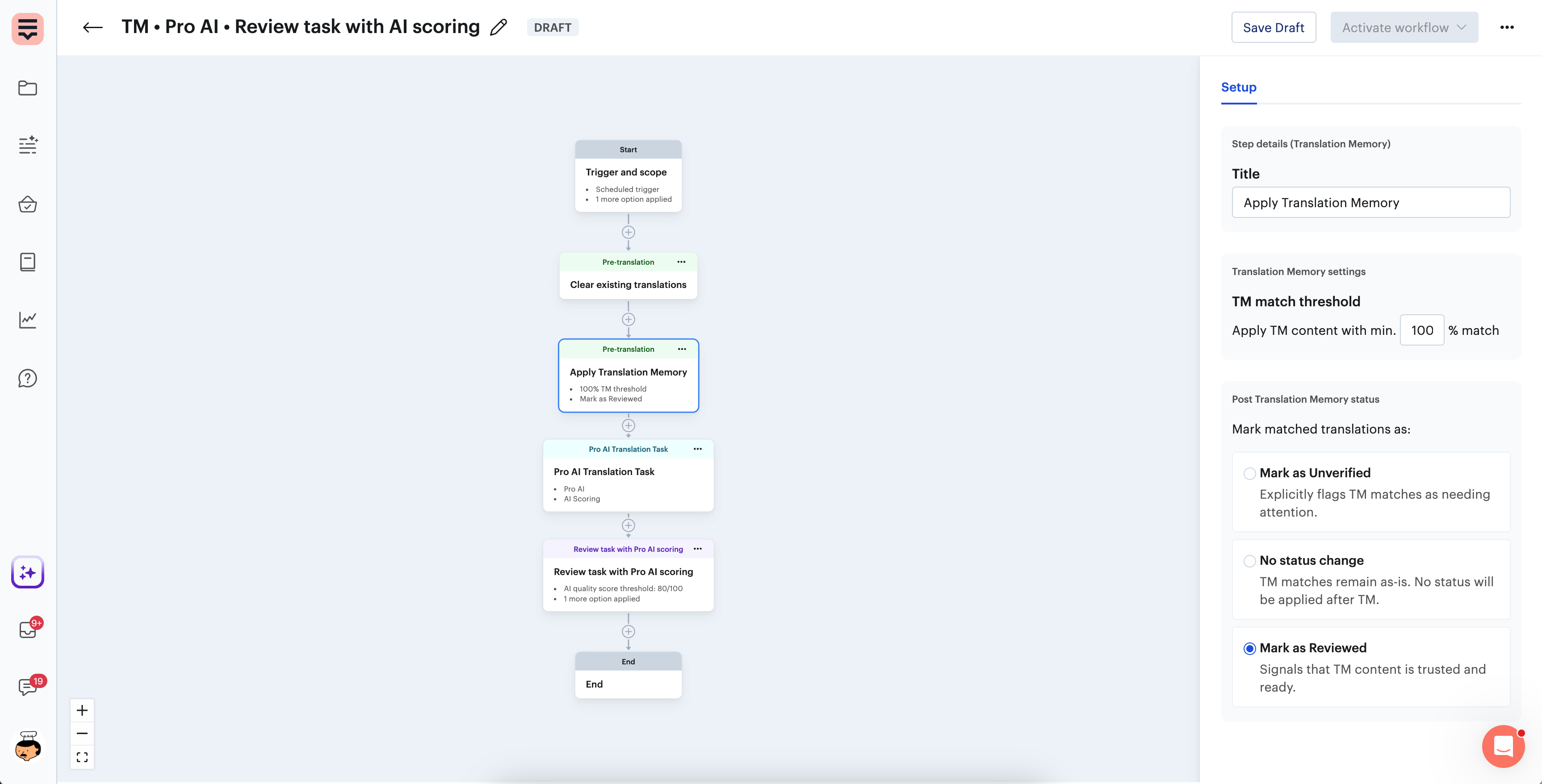
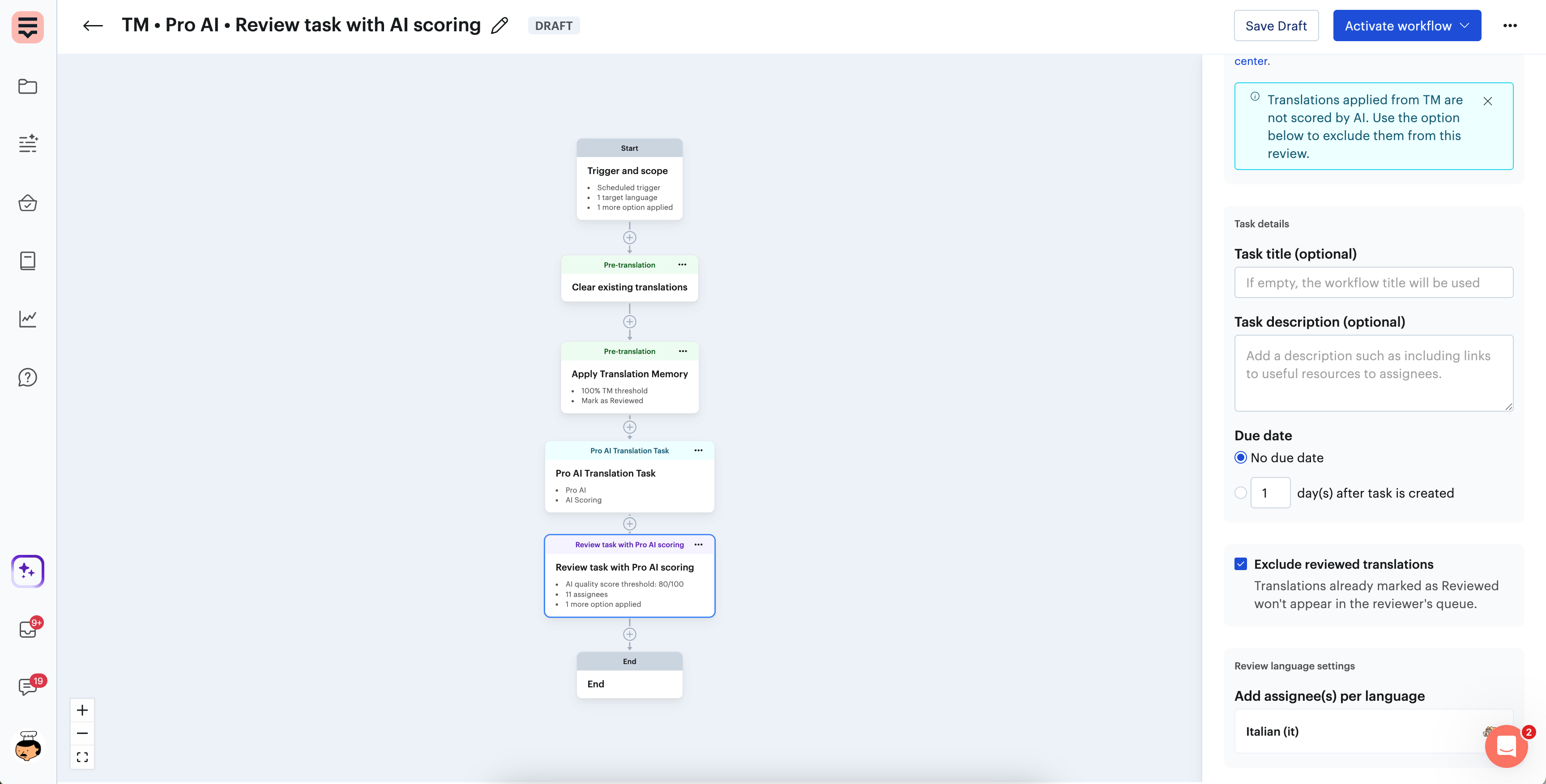
More control over TM matches and review scope in Workflows
🌟 What's new?
Two new configuration options are now available in Workflows:
- Post TM status for "Apply TM" steps — when setting up an Apply TM step, you can now choose what status gets assigned to TM-matched translations automatically: mark them as Reviewed, Unverified, or keep the current status.
- Exclude reviewed translations from review tasks — when configuring a Review task step (including AI Scoring review tasks), you can now exclude translations already marked as Reviewed from the task scope. Reviewers only see segments that actually need attention.
🎯 Why it matters?
- TM matches can now flow through your workflow fully hands-off: automatically filled, flagged as reviewed, and skipped in downstream review steps — so your team's time goes where it counts.
- Previously, TM-matched translations still appeared in review tasks, creating unnecessary work and reducing the cost-saving value of TM. That friction is now gone.
- This makes Workflows a more powerful tool for cutting review costs and building leaner localization processes.
June 18, 2026
Glossary Guard is now available as a web app
🌟 What’s new?
Lokalise Glossary Guard, the tool that automatically checks and fixes your glossary CSV files before you upload them to Lokalise — is now available as a browser-based web app, in pre-release.
- Simply visit lokalise-glossary-guard.web.app, upload your glossary CSV file, and download the fixed version — no terminal or installation required.
- The tool automatically detects and resolves common glossary issues such as wrong separators, encoding problems, duplicate entries, and formatting inconsistencies.
- This is a pre-release version, so expect ongoing improvements based on early feedback.
🎯 Why it matters to you?
- Getting your glossary files upload-ready used to mean either fixing issues by hand or running a command-line tool — neither ideal if you're not a developer.
- This web app makes Glossary Guard accessible to everyone on your team, no technical setup needed.
- You can now validate and clean glossary files in seconds, reducing upload errors and keeping your localization workflows running smoothly.
June 2, 2026
Human-reviewed AI/MT translations now saved to Translation Memory
🌟 What’s new?
Translation Memory just got smarter about what counts as a validated translation:
Previously, when AI or machine-translated content went through a human review task, only translations that were manually edited by the reviewer were saved to TM.
Now, any AI/MT translation that a reviewer marks as Reviewed (even without edits) is automatically saved to TM under the reviewer's name.
This applies regardless of how the reviewed status is set: clicking the Reviewed icon, using a keyboard shortcut, bulk actions, or saving within the review task.
🎯 Why it matters to you?
If you run AI or machine translation through a human review step, you've already been doing the hard work of validating those translations, now Lokalise captures that work:
Grow your TM faster, without requiring reviewers to make edits just to trigger a save.
Reuse more validated content in future projects, improving TM leverage and reducing repeated review of already-approved translations.
Build a higher-quality TM over time, since every entry is traceable to a human reviewer who signed off on it.
May 25, 2026
Translation Quality Analytics is now available in Open Beta
🌟 What’s new?
Analytics has a new section: Translation Quality. It gives you a clear picture of how much post-editing your reviewers are doing and where quality issues originate across your localization workflows. The new reports include:
- Post-edit rate & average edit distance, understand how heavily AI or machine translations are being corrected
- Review effort distribution, see how effort is spread across languages, workflows, and contributors
- Workflow & language quality patterns, identify which setups produce the most reliable translations
- Translator and reviewer trends, track individual and team-level quality signals over time
One important detail: cases where reviewers had to fully retranslate or create new translations from scratch are tracked separately. They appear in the broader review-effort visualizations but are excluded from post-edit rate and edit distance calculations, so your quality metrics stay accurate and aren't skewed by retranslation events.
This release also brings a refreshed Analytics experience overall: improved navigation, OTA reporting now available directly in Analytics and updated copy throughout.
🎯 Why it matters to you?
Until now, Analytics gave you strong visibility into volume and throughput, but not into whether translations were actually good. This release fills that gap:
- Know if your translations are ready, spot patterns that signal quality problems before they reach production
- Understand real reviewer workload, see how much post-editing work reviewers are actually doing, not just how many tasks they completed
- Find the workflows that scale, identify which language/workflow combinations are efficient and which need attention
- Trace quality issues to their source, pinpoint whether problems stem from a specific language, contributor, or workflow step
April 23, 2026
Richer review metrics in Task Analytics
🌟 What’s new?
The Task progress detail by contributor view (under Analytics → Tasks) now includes 7 new Translation Review metric columns per contributor:
- Reviewed Segments
- Acceptance Rate
- Accepted Segments
- Edit Buckets (Light/Medium/Heavy/Content Created)
- Average Edit Score, Review Turnaround (hours)
- Average AI Score.
Table tooltips were also updated for better clarity around edit effort and scoring.
🎯 Why it matters to you?
You get a granular, contributor-level view of review quality — not just task completion. Teams importing data can now surface review signals previously invisible, helping them spot bottlenecks and make smarter resourcing decisions.
April 22, 2026
Filter Task Analytics by creation or completion date
🌟 What’s new?
The Tasks Time Analytics dashboard now lets you filter data by date — choose between when a task was created or when it was completed. Previously, the dashboard defaulted to creation date only, with no way to switch. This update is live for all customers all pricing plans.
- Creation date — view tasks based on when they were created
- Completion date — view tasks based on when they were actually finished
🎯 Why it matters to you?
Analytics should reflect how your team actually works, and for most teams, what matters is when work gets done, not just when it starts. This update makes task data more accurate and actionable across a range of workflows:
Payment and billing reconciliation — filter by completion date to get the metrics that match how your invoicing works
In-progress task analysis — get insights on completed languages within a partially finished task, without waiting for all languages to wrap up (e.g. 4 out of 5 languages done? Those insights are available now)
April 2, 2026
Snapshots are now dramatically faster and self-serve
🌟 What’s new?
Project snapshots have been overhauled with major performance and usability improvements:
- 83% faster snapshot creation — what previously took over five hours for large projects now completes in under an hour, with individual snapshots averaging under a second
- Async snapshot restoration — restores now run in the background; you'll receive an in-app notification and email when your restore is complete, so no more waiting on-screen
- 10x smaller snapshot size — compressed storage footprint is dramatically reduced across the board
🎯 Why it matters to you?
If you manage large projects, this is a significant unlock. Previously, restoring a snapshot on big projects could fail entirely, requiring direct support from Lokalise — now you can do it yourself, independently and reliably.
Faster creation also means the automatic snapshots triggered by bulk actions (pseudolocalize, fill text, copy source to target, clear, and more) no longer slow down your workflow.
Never miss an update!
Be the first to know about product releases—get updates every two weeks in your inbox.
Case studies


Behind the scenes of localization with one of Europe’s leading digital health providers
Read more Case studiesSupport

Company
Follow



Localization workflow for your web and mobile apps, games and digital content.
©2017-2026
All Rights Reserved.