
Lokalog
Discover what’s new at Lokalise with our latest product releases – empowering your localization journey one update at a time
October 24, 2025
Lokalise Plugin for Figma Buzz
🌟 What’s new?
We’re excited to share that Lokalise was part of the official launch of Figma Buzz, Figma’s new tool for managing and localizing content directly within design workflows. Our Lokalise Plugin for Figma Buzz is available from day one, allowing you to translate and manage your design content seamlessly inside Figma Buzz.
🎯 Why it matters to you?
You can now connect design and localization teams earlier in the process, ensuring brand-consistent translations right where content is created. Launching alongside Figma Buzz puts Lokalise at the heart of Figma’s growing ecosystem — empowering you to manage translations more efficiently from design to delivery.
October 8, 2025
Introducing Custom AI Profiles
🌟 What’s new?
Custom AI Profiles, powered by Advanced Retrieval augmented generation (RAG) let you improve AI translation output by providing examples from your own past translations and project context. Profiles allow you to:
- Specify source and target languages, pulling relevant TM entries for those pairs.
- Apply a TM date filter to limit examples to a specific timeframe.
- Activate profiles per project to control where they apply.
Currently, three retrieval sources are supported:
- Translation Memory (TM) – historical translations
- Tags – filter examples by project or string-level tags (e.g., product area, tone)
- Reviewed translations – prioritize quality-approved examples"
🎯 Why it matters to you?
You’ll see higher translation quality, consistency, and brand alignment, as AI mirrors your team’s preferred wording and style. This also reduces manual edits, boosting efficiency and increasing acceptance rates to 90%+.
👉 Interested in trying this powerful feature early? Join our Beta program →
October 8, 2025
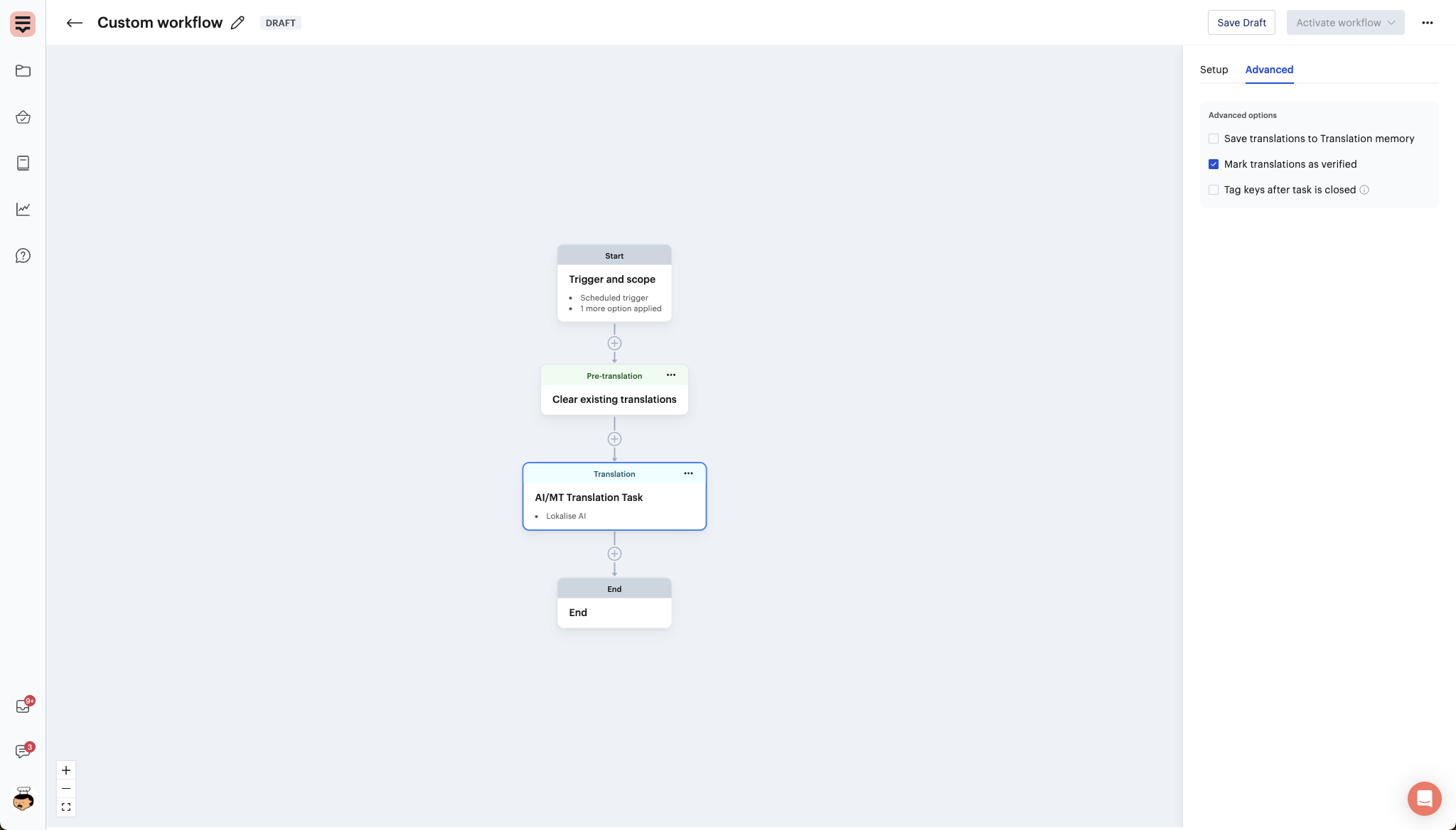
Save AI/MT translations to TM in Workflows
🌟 What’s new?
We’ve added an option in the Workflow editor for Automatic Translation Tasks to automatically save translations performed by AI or MT directly to your Translation Memory.
🎯 Why it matters to you?
Your translations are now automatically captured in your TM, reducing manual steps and ensuring that all AI/MT translations contribute to your reusable content, making future translations faster and more consistent.
September 29, 2025
Python SDK Updated to Version 4
🌟 What’s new?
Our Python SDK for the Lokalise API has been upgraded to version 4 with a completely reworked typing system.
The main change: the entire typing system has been rebuilt. This means the SDK now provides complete and accurate type annotations for all methods, models, and responses. Editors and tools like Pyright, PyCharm, VS Code, and mypy can now understand the SDK structure properly.
🎯 Why it matters to you?
Developers now get type hinting directly in their code editors, making it easier to write, understand, and maintain code when working with the SDK. This leads to faster development, fewer errors, and a smoother integration experience.
September 18, 2025
Workflows Now Automatically Assign Contributors
🌟 What’s new?
Workflow steps that require assignees — for translation or review — now automatically assign contributors based on their language and role. This matches the logic used in task creation and eliminates the need for manual assignment.
Note: Currently, you need to navigate to the specific translation or review task step for assignees to populate. This will be fixed in a future update.
🎯 Why it matters to you?
You’ll save time and effort, especially when working with many target languages, as contributors are assigned automatically. This makes workflow setup faster, reduces errors, and keeps your localization process moving smoothly.
September 17, 2025
GitHub Actions for File Exchange Updated to v4
🌟 What’s new?
Our GitHub Actions for file exchange have been upgraded to version 4, introducing a lighter, more efficient package that no longer relies on a CLI tool. The update also includes various performance and reliability improvements.
🎯 Why it matters to you?
You’ll benefit from faster, more stable file exchange between Lokalise and GitHub, with improved error handling. Most customers won’t be affected by breaking changes, but you can review the full release notes here:
September 15, 2025
Upgrade to GPT-5 for Improved AI Translation Quality
🌟 What’s new?
We’ve upgraded to GPT-5, the latest model from OpenAI. This update improves translation accuracy and consistency, especially for languages with less training data, and strengthens AI scoring for more reliable results.
🎯 Why it matters to you?
You’ll notice more stable, high-quality outputs in your AI translations with no extra setup required. GPT-5’s stronger instruction-following means translations better reflect your source content and style preferences, helping your team work faster with fewer edits.
September 8, 2025
Lokalise + Ditto: API upgrade and better tag handling
🌟 What’s new?
We’ve upgraded our Ditto integration to their new public API, improving performance and scalability for larger projects. We’ve also enhanced the tagging experience with:
- Key metadata now displayed as tags at the key level
- Project ID and Project Name available in Content Management for easier handling
🎯 Why it matters to you?
These improvements make the integration faster, more reliable, and easier to use — especially when managing large-scale projects with lots of metadata. You’ll have more clarity and control over your content, right where you need it.
September 8, 2025
Lokalise + Webflow: Component support is here
🌟 What’s new?
Our Webflow integration now supports Webflow components, one of the most requested features from customers. You can now localize and manage content inside components seamlessly.
🎯 Why it matters to you?
With full support for components, you can cover more of your Webflow projects without workarounds. This makes it easier to keep every part of your site localized, speeding up workflows and ensuring a more consistent experience across languages.
August 29, 2025
Clearer Scheduling with Local Timezones in Workflows
🌟 What’s new?
You can now choose between UTC and Local timezone when setting up scheduled triggers in workflows.
- In the Trigger Step, select the timezone that best fits your needs.
- All workflow and workflow run listings now display dates in your local timezone, with a tooltip for reference.
🎯 Why it matters
This update makes it easier to understand exactly when your workflows will run. By seeing times in your local timezone, you’ll avoid confusion, set clearer expectations, and manage scheduled triggers with confidence.
Never miss an update!
Be the first to know about product releases—get updates every two weeks in your inbox.
Case studies


Behind the scenes of localization with one of Europe’s leading digital health providers
Read more Case studiesSupport

Company
Follow



Localization workflow for your web and mobile apps, games and digital content.
©2017-2026
All Rights Reserved.