

Developer Guides & Tutorials

MCP vs REST API for Localization: When to Use Each

Ilya Krukowski,Updated on June 10, 2026·13 min read
MCP vs REST API.webp

Lokalise gives developers two programmatic ways to manage localization workflows: the REST API and the MCP Server. In any MCP vs API localization decision, the key point is that one does not replace the other.

  • The REST API is built for scripted, repeatable, deterministic automation, such as CI/CD pipelines, batch imports, and webhook-driven deployments.
  • MCP is built for agent-driven, conversational, ad-hoc tasks, such as adding keys from an IDE or checking project status in natural language.

Both connect to the same localization platform. This guide explains when to use each interface — and when to use both together.

Quick summary: MCP vs REST API

MCP and the REST API are different interfaces for different localization workflows. Use MCP when a developer, localization manager, product manager, content team, or AI agent needs to describe an outcome, inspect project state, or complete supported localization tasks without building the integration flow step by step. Use the REST API when a system needs explicit control over requests, predictable automation, broad feature coverage, structured error handling, and repeatable execution.

The rule is simple: MCP is better when users define the outcome and an agent handles the supported actions. The REST API is better when engineering teams need to define and control every step of CI/CD, batch processing, webhook-driven workflows, or production automation.

When to use MCP

Use MCP when the user knows the outcome they need but should not have to design the integration behind it. Instead of selecting endpoints, assembling payloads, and coordinating several API calls, a developer, product manager, localization manager, content team, or AI agent can describe the task and let the agent use the supported Lokalise tools.

This makes localization workflows accessible beyond engineering teams. Users can inspect project data, create keys, manage tasks, and take action through an AI client without building and maintaining a custom integration for each workflow.

You can learn more in the Lokalise MCP Server docs.

Adding a translation key while writing code

A developer working in an IDE may notice a hardcoded checkout error message and want to turn it into a localization key immediately.

Create a new key for this checkout error message and add English source text.

MCP fits this workflow because the agent can use the surrounding code context and act without forcing the developer to switch tools. There is no need to open a localization dashboard, choose an endpoint, build a request payload, or write a one-off script. The developer describes the outcome, and the agent handles the supported Lokalise actions.

Checking project coverage in natural language

MCP also works well when someone needs an answer about localization status. A product manager, localization manager, or developer might want to know whether each locale is ready for release without digging through raw project data.

Show me which locales in the checkout project are below 95% translation coverage.

The user wants an answer, not a JSON payload. The next action may depend on which locales are incomplete, how large the gaps are, and whether they affect release-critical parts of the product. MCP can inspect the project, summarize the result, and keep the workflow open for follow-up questions.

This also allows teams outside engineering to work with localization data directly through an AI agent rather than requesting a new report, dashboard, or internal script.

Creating a localization task conversationally

MCP is a strong fit for workflows that combine discovery, filtering, and action. A localization manager may want to find missing Japanese translations in a checkout project and create a task for the right team.

Create a task for untranslated Japanese checkout strings and assign it to the Japanese translation team by Friday.

Implementing this directly may require several API calls and additional logic to find the strings, filter the results, identify the assignee, and create the task. With MCP, the user describes the outcome while the agent coordinates the supported actions.

This reduces the amount of integration code and infrastructure the team has to build and maintain. It also lets non-developers automate localization work without owning a custom API integration.

Use MCP when users should define the outcome rather than orchestrate every execution step. It is well suited to interactive, context-aware, and human-in-the-loop localization workflows that can be completed through supported MCP tools.

When to use the REST API

Use the REST API when the localization workflow must run the same way every time. If the task belongs in CI/CD, a migration script, a deployment process, or a backend service, the API is usually the right interface. It gives developers explicit inputs, structured outputs, predictable failures, and automation that does not depend on conversational interpretation.

Pulling translations in CI/CD

A strong REST API use case is syncing approved translations into your codebase as part of a GitHub workflow. This is a common continuous localization pattern: translations are updated, reviewed, pulled into the repository, and shipped without turning localization into a manual release blocker. You do not have to build this from scratch with raw curl commands. For GitHub-based projects, the lokalise-pull-action can pull translation files from Lokalise into your repository and open the result as a pull request.

That is exactly where the REST API model wins: the workflow is repeatable, reviewable, and easy to wire into the rest of your delivery process. The pipeline has known credentials, known project settings, known file paths, and a predictable Git output: a translation update PR.

name: Pull translations from Lokalise

on:
  workflow_dispatch:
  schedule:
    - cron: "0 8 * * 1-5"

jobs:
  pull-translations:
    runs-on: ubuntu-latest

    steps:
      - name: Checkout repository
        uses: actions/checkout@v6
        with:
          fetch-depth: 0

      - name: Pull translations
        uses: lokalise/lokalise-pull-action@v5.2.0
        with:
          api_token: ${{ secrets.LOKALISE_API_TOKEN }}
          project_id: ${{ secrets.LOKALISE_PROJECT_ID }}
          base_lang: en
          translations_path: locales
          file_format: json
          additional_params: >
            {
              "export_empty_as": "skip",
              "export_sort": "a_z",
              "replace_breaks": false
            }

This is a better fit for the REST API than MCP because there is no conversation to have at runtime. The pipeline should not ask what to do next. It should pull the expected files, create a diff, open a pull request, and fail loudly if something is wrong.

Batch key creation from a CSV migration

The REST API is also the better choice when a team needs to migrate hundreds or thousands of existing strings into Lokalise. In this scenario, a script can read a CSV file, validate each row, transform it into the required payload, create keys in bulk, and log every response.

This workflow needs batching, validation, retry logic, and repeatability. If one row fails, the script should capture the error, continue safely if appropriate, and make the failed item easy to inspect later. That is structured automation, not a conversational workflow.

for (const row of csvRows) {
  await createLocalizationKey({
    key_name: row.key,
    description: row.description,
    platforms: ["web"],
    translations: [
      {
        language_iso: "en",
        translation: row.source_text
      }
    ]
  });
}

MCP can help inspect or discuss a migration plan, but the actual migration should usually run through the API. Large imports need logs, retry behavior, and deterministic execution.

Webhook-driven deployment automation

The Lokalise REST API also wins in event-driven workflows, especially when teams are deploying Lokalise as part of a larger localization delivery pipeline.. A good example is an AI-powered translation pipeline where a webhook fires after a translation task is completed. The webhook handler validates the event, checks that it belongs to the right project, fetches the relevant task details, and downloads the finished translations.

Translation task completed
 Lokalise sends a webhook event
 Backend validates the shared secret
 Backend checks the task and project
 Backend fetches target languages through the API
 Backend downloads the translated files
 Deployment or repository sync continues

This is the kind of workflow that should not depend on a conversational layer. When a project.task.closed event arrives, the system needs to know exactly how to respond. It should validate the request, process the event, acknowledge it, and either continue the deployment flow or return a clear error.

app.post("/webhooks/notifications", async (req, reply) => {
  const payload = req.body;
  const secret = req.headers["x-secret"];

  if (secret !== process.env.LOKALISE_WEBHOOKS_SECRET) {
    return reply.status(403).send({ error: "Forbidden" });
  }

  if (payload.event !== "project.task.closed") {
    return reply.status(200).send({ status: "ignored" });
  }

  const languages = await getTaskTargetLanguages(payload.task.id);
  await downloadTranslations(languages);

  return reply.send({ status: "task processed" });
});

The REST API fits because event-driven automation needs predictable inputs and outputs. Every step can be versioned, monitored, retried, and tested. MCP is useful when a person needs to ask questions or make decisions, but production automation should not depend on an agent interpreting a prompt.

Find full example in our tutorial: Building an AI-powered translation flow using Lokalise API and webhooks.

Side-by-side example: same task, two approaches

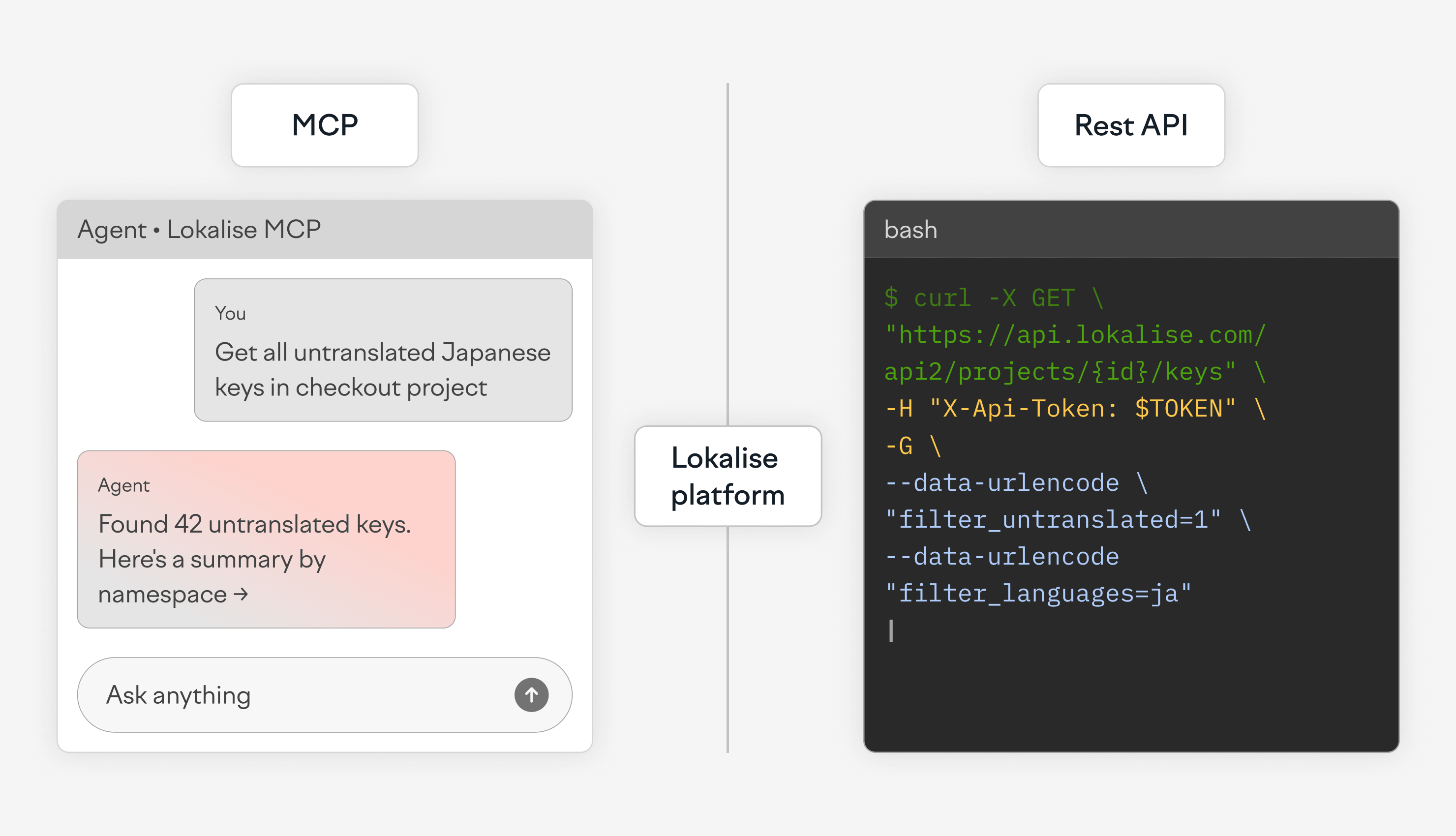
Consider this task: find all untranslated Japanese keys in the checkout project and group them by namespace. With MCP, the user describes the outcome they need. With the REST API, the developer defines the request and handles the response in code.

MCP approach

With MCP, a developer or localization manager can describe the result in natural language:

Find all untranslated Japanese keys in the checkout project and group them by namespace.

An agent-style response could look like this:

I found 18 untranslated Japanese keys in the checkout project.

checkout.payment
- checkout.payment.card_declined
- checkout.payment.insufficient_funds
- checkout.payment.unknown_error

checkout.shipping
- checkout.shipping.address_invalid
- checkout.shipping.method_unavailable

checkout.review
- checkout.review.terms_required
- checkout.review.place_order_error

Suggested next step:
Create a task for the Japanese translation team with these 18 keys and set the deadline to Friday.

The user does not need to select endpoints, resolve the sequence of API calls, parse the response, or write grouping logic. The agent handles the supported actions and returns the information in a form that can be reviewed immediately.

The workflow can then continue through follow-up instructions, such as creating a task, changing the grouping, excluding specific namespaces, or checking whether the affected strings block a release.

Use MCP when the user should describe the outcome, inspect the result, and decide what happens next without building a custom integration flow.

REST API approach

With the REST API, the same task becomes a repeatable query. First, resolve the Japanese language ID for the project. Then request untranslated keys for that language.

curl --request GET \
     --url 'https://api.lokalise.com/api2/projects/123.abc/keys?include_translations=1'\
'&filter_translation_lang_ids=JA_LANG_ID'\
'&filter_untranslated=1'\
'&limit=500' \
     --header 'X-Api-Token: YOUR_TOKEN' \
     --header 'accept: application/json'

The API response is machine-readable and can be passed into another script, stored in logs, retried, or used to create a task automatically.

{
  "project_id": "123.abc",
  "keys": [
    {
      "key_id": 982341,
      "key_name": {
        "web": "checkout.payment.card_declined"
      },
      "filenames": {
        "web": "checkout.json"
      },
      "translations": [
        {
          "language_iso": "ja",
          "translation": ""
        }
      ]
    },
    {
      "key_id": 982342,
      "key_name": {
        "web": "checkout.shipping.address_invalid"
      },
      "filenames": {
        "web": "checkout.json"
      },
      "translations": [
        {
          "language_iso": "ja",
          "translation": ""
        }
      ]
    }
  ]
}

From there, a script can group keys by namespace using your own naming convention:

const groupedByNamespace = keys.reduce((groups, key) => {
  const keyName = key.key_name.web;
  const namespace = keyName.split(".").slice(0, 2).join(".");

  groups[namespace] ||= [];
  groups[namespace].push(keyName);

  return groups;
}, {});

This is where the REST API is useful. The result can feed another system. The query can run every day, after every merge, or before every release. The output format can be parsed, validated, logged, and tested.

Use the REST API when the result is part of an automation contract.

Full comparison table: MCP vs REST API for localization

MCP and the REST API provide access to the same localization platform, but they divide responsibility differently. With MCP, the user describes the outcome and an AI agent selects the supported actions. With the REST API, the engineering team defines and controls each request, response, and execution step.

DimensionMCPREST API
Core modelMCP lets a user describe a localization outcome in natural language and allows an AI agent to select the supported tools needed to complete it.The REST API lets a developer call specific endpoints with explicitly defined parameters, payloads, and execution logic.
Workflow definitionThe user defines what should happen, such as finding untranslated keys, creating a task, or adding target languages.The developer defines how the workflow happens, including the endpoint sequence, data transformations, validation, retries, and failure paths.
Best forMCP suits outcome-based, context-aware workflows that combine inspection, decisions, and supported Lokalise actions.The REST API suits workflows that require direct control, stable request contracts, broad platform access, or fixed execution paths.
Primary usersMCP can be used by developers, product managers, localization managers, content teams, and other AI-tool users who understand the required outcome.The REST API is primarily used by developers, DevOps engineers, backend teams, and integration specialists.
Access to automationMCP allows teams outside engineering to run supported localization workflows without writing an API client or maintaining a custom script.REST API automation normally requires engineering work to design, build, deploy, and maintain the integration.
Best environmentMCP fits AI assistants, IDEs, agent platforms, and internal tools where users already work and provide context.The REST API fits CI/CD pipelines, backend services, scheduled jobs, migration scripts, deployment systems, and custom applications.
SetupMCP setup usually involves connecting an MCP-compatible client to a hosted Lokalise endpoint, authenticating, and enabling the required toolkit.REST API setup involves managing credentials, selecting endpoints, writing or configuring a client, and implementing the workflow logic.
AuthenticationMCP supports OAuth 2 as the recommended option, with API-token authentication available as an alternative.REST API integrations can use API tokens or implement OAuth 2 when an application needs to act on behalf of users.
Available toolkitsMCP provides separate project management and software development toolkits for supported localization actions.The REST API organizes capabilities through endpoints for projects, keys, translations, tasks, files, contributors, screenshots, and other resources.
Feature coverageMCP covers supported actions exposed by its current toolkits. It does not expose every REST API operation and is still evolving.The REST API provides broader and more granular platform coverage, including operations that are not available through MCP tools.
Multi-step workflowsAn agent can select and combine supported tools after the user describes the result they need.The integration must explicitly coordinate every API call and pass the required data between steps.
Custom code requiredSupported MCP workflows may require little or no custom integration code beyond client configuration.REST API workflows generally require scripts, application code, integration platforms, or existing API-based tooling.
Maintenance burdenLokalise owns the hosted MCP server and tool definitions, reducing the amount of workflow-specific integration logic customers need to maintain.The customer owns the API client, request logic, dependencies, deployment, monitoring, retries, and updates to the integration.
Conversational contextMCP can use the user’s prompt and available agent context to interpret the requested outcome and support follow-up instructions.The REST API does not interpret intent or conversation. Every input must be converted into explicit request parameters and payloads.
DeterminismMCP execution can depend on the prompt, agent reasoning, available context, and the supported tools selected by the agent.REST API execution is defined by code, making request sequences, validation rules, and outputs easier to reproduce exactly.
ControlMCP gives the agent control over how supported actions are selected and combined within the user’s request.The REST API gives the engineering team direct control over endpoints, payloads, ordering, branching, retries, and recovery logic.
Error handlingMCP can explain a failure in natural language and let the user clarify the request, change the approach, or retry interactively.The REST API returns structured status codes and errors that applications can log, classify, retry, or use to stop a workflow.
Rate limitsMCP uses the Lokalise REST API under the hood, so the same API rate limits and restrictions apply.REST API requests are subject to the documented API rate limits and endpoint-specific restrictions.
PermissionsMCP actions run within the permissions of the authenticated user or API token, so the agent cannot access projects or actions unavailable to that identity.REST API access is determined by the API token or OAuth scopes and the permissions of the associated user.
Audit trailMCP auditability depends on Lokalise activity records and the logs retained by the AI client, agent platform, or MCP environment.REST API integrations can record requests, responses, job runs, deployment logs, and application-level audit data directly.
CI/CD readinessMCP is not the default execution layer for pipelines that must follow an identical path on every run without agent interpretation.The REST API is suited to CI/CD because the workflow can use fixed requests, stable outputs, structured failures, and controlled retries.
Batch operationsMCP can start or coordinate supported actions, but it is not intended to replace purpose-built code for large data migrations or tightly controlled bulk processing.The REST API is suited to batch imports, exports, migrations, and mass updates where the integration controls chunking, validation, and retry behavior.
Infrastructure ownershipMCP can remove the need to host a separate service for supported agent-driven workflows.REST API workflows may require hosted services, scheduled workers, queues, databases, secrets management, and monitoring infrastructure.
Production useMCP fits production-related work where a person or agent defines the outcome and remains involved in reviewing or directing the workflow.The REST API fits unattended production processes that must run predictably without waiting for interpretation or human input.
Best MCP use caseAsk an agent to find untranslated Japanese checkout keys, group them by namespace, create a task, assign the team, and set a deadline.Not applicable: this column describes the MCP example.
Best REST API use caseNot applicable: this column describes the REST API example.Pull approved translations during CI/CD, migrate thousands of keys, or deploy updated files after a webhook event.

MCP reduces the distance between a localization need and a working workflow. It allows more people to automate supported tasks without owning the integration behind them. The REST API remains the right choice when engineering teams need full platform coverage and direct control over every execution step.


Conclusion

MCP and the REST API are two ways to work with the same localization platform, but they assign responsibility differently.

With MCP, users describe the outcome they need and an AI agent carries out the supported actions. This allows developers, product managers, localization managers, and content teams to build workflows without selecting endpoints, coordinating API calls, or maintaining custom integration code for every task.

With the REST API, engineering teams control each request and execution step. It remains the right choice for CI/CD pipelines, batch migrations, webhook-driven deployments, scheduled syncs, and unattended processes that need fixed inputs, structured errors, retries, and detailed logs.

The choice should come from the workflow, not only from Lokalise pricing or a feature checklist. Use MCP when an agent can handle the supported outcome and reduce the integration work your team owns. Use the REST API when you need broader platform coverage and direct control over system behavior. In many localization setups, the two interfaces work best together.

MCP vs API localization: Frequently asked questions

Is MCP a replacement for the REST API?

Can I use MCP and the REST API in the same localization project?

Does MCP support every REST API feature?

Do MCP and the REST API have the same rate limits?

Which is more secure: MCP or the REST API?

Which should I use for CI/CD localization?

Developer Guides & Tutorials

Author

1517544791599.jpg

Lead of content, SDK/integrations dev

Ilya is the lead for content, documentation, and onboarding at Lokalise, where he focuses on helping engineering teams build reliable internationalization workflows. With a background at Microsoft and Cisco, he combines practical development experience with a deep understanding of global product delivery, localization systems, and developer education.

He specializes in i18n architectures across modern frameworks — including Vue, Angular, Rails, and custom localization pipelines — and has hands-on experience with Ruby, JavaScript, Python, Elixir, Go, Rust, and Solidity. His work often centers on improving translation workflows, automation, and cross-team collaboration between engineering, product, and localization teams.

Beyond his role at Lokalise, Ilya is an IT educator and author who publishes technical guides, best-practice breakdowns, and hands-on tutorials. He regularly contributes to open-source projects and maintains a long-standing passion for teaching, making complex internationalization topics accessible to developers of all backgrounds.

Outside of work, he keeps learning new technologies, writes educational content, stays active through sports, and plays music. His goal is simple: help developers ship globally-ready software without unnecessary complexity.

Illustration of Lokalise APIv2 in practice

Lokalise APIv2 in practice

In one of my previous articles I was covering Lokalise APIv2 basics, explaining its key features, and how to get started with it. Today we are going to work a bit more with the API using Node, Ruby, and Python SDKs. We are going to cover some real-world scenarios and discuss different code samples. By the end of this article you’ll be able to put your knowledge to work in real projects.

Updated on September 20, 2024·Ilya Krukowski
Continuous_localization

How to implement continuous localization in your CI/CD workflow

What if your translations updated the moment your code changed? Continuous localization is a DevOps-aligned workflow where translation is integrated into the software development lifecycle (SDLC). Unlike traditional waterfall methods, it automates the synchronization between code repositories and translation platforms, so global content updates in real time as new code is pushed to production. This removes translation latency, keeps context intact, and ensures every market sees th

Updated on May 15, 2026·Emils Veveris
