

A translation changed, but no one knows who did it or when. The release is already live. What do you do?
When multiple contributors work on the same project, there’s a good chance that strings get edited, approved, overwritten, or renamed. Without a clear localization audit trail, small changes turn into production issues, and tracking them down takes time you don’t have.
This lack of visibility slows you down significantly. It makes troubleshooting harder, weakens accountability, and introduces risk in areas where accuracy matters most (like user-facing messaging, legal content, or product-critical flows).
When you don’t have a reliable record of what actually happened, you end up relying on guesswork or manual checks. Localization key governance brings structure to the workflow.
🔎 Localization audit, simplified
In this article, you’ll learn how to track, monitor, and audit translation changes in Lokalise. We’ll walk through how to see who changed a key, how to review the full history of a string, and how to maintain a clean audit trail across all your localization assets.
What is localization key governance?
Localization key governance is the practice of controlling, monitoring, and auditing all changes made to translation keys and their associated content within a TMS. It encompasses who can edit source strings, how changes are tracked over time, and how teams can reconstruct the full history of any translation decision.
In Lokalise, key governance is enforced through a combination of role-based access controls, project activity logs, and enterprise-level audit logs. This means every change is visible and attributable.
Every version of a specific translation, including previous values
Together, these features give you end-to-end visibility and control over every change across your localization workflow.
Localization key governance helps you:
Prevent errors reaching production
Ensure accountability (who changed what)
Support compliance and internal audits
🌍 Governance matters even more with a fully remote team
Localization audit trail matters even more in distributed teams, where translators, reviewers, and product teams work across languages and time zones. Changes happen constantly, often in silo and without direct communication.
A reviewer might overwrite an approved translation to fix something small in the process of software localization, or a source string might be updated without anyone flagging it. With proper governance, every decision is recorded in one place.
Version control vs. audit trails in localization
Version control manages different states of a localization project over time, while an audit trail records the individual user actions and decisions that produced each state.
Both are important, but they solve different problems.
Version control focuses on the state of your content. It lets you capture snapshots of a project at a specific point in time, compare versions, and roll back if needed. In localization, this often shows up as project snapshots, branches, or tagged releases. It’s useful when you need to align translations with a specific product version or deployment.
In many teams, this model is evolving toward continuous localization, where content is updated and deployed alongside development instead of in fixed release cycles.
An audit trail, on the other hand, focuses on actions. It tells you what actually happened inside those versions, for example:
Who edited a string?
When was the translation updated?
What changed between one version and the next?
Instead of showing you the outcome, it shows you the sequence of decisions that led there.
🗒️ Key takeaway
Version control can tell you that a translation looked different in the previous release. An audit trail tells you who changed it, when they changed it, and what the previous value was.
Relying on version control alone leaves a gap. You can see that something changed, but not how or why it happened. With an audit trail in place, that gap disappears.
How to track which user changed a localization key in Lokalise
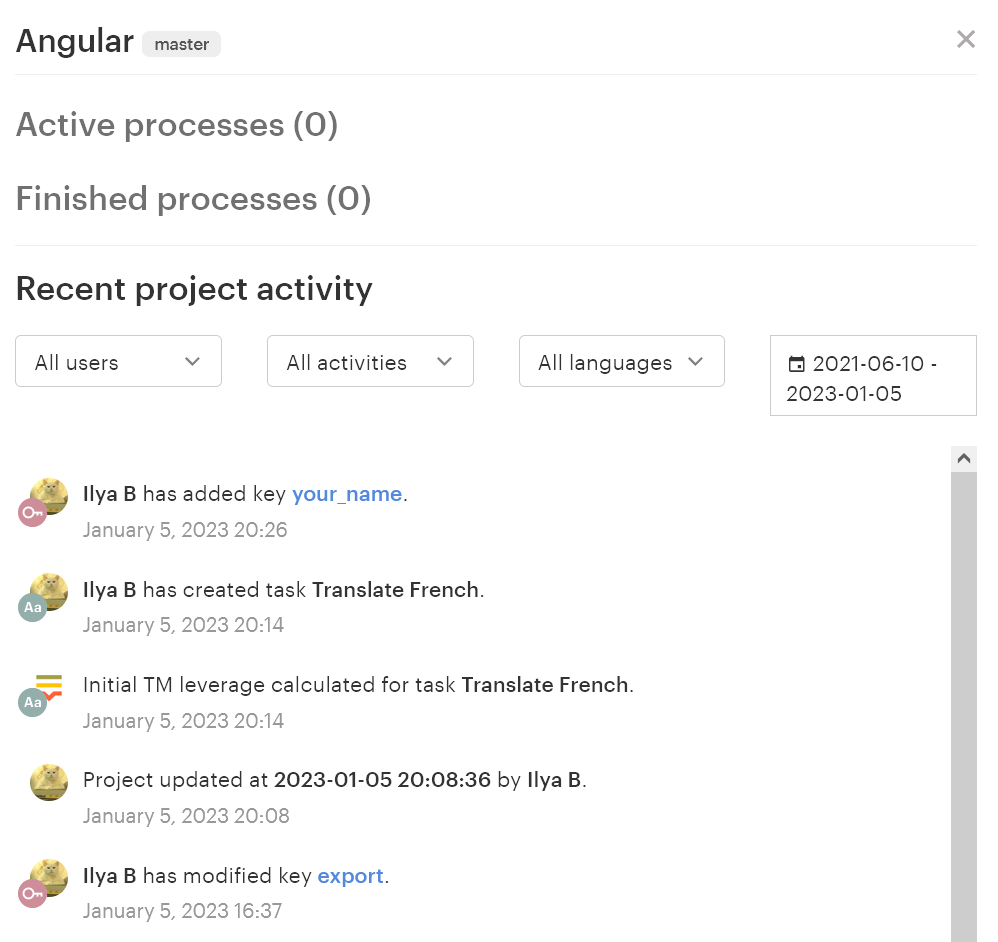
Lokalise records every key-level change in the Project Activity log, showing the user who made the change, the exact timestamp, and the specific action taken — including edits to source strings, translation values, key names, and metadata.
The lifecycle of a key-level change looks like this:
Initial edit → Review → Approval → Logged in Project Activity → Archived in Audit Log
This flow shows how a single change moves from creation to full traceability. A translator or editor updates a string, a reviewer validates it, and once approved, the change is recorded in Project Activity. From there, it becomes part of the broader Audit Log, where it can be reviewed alongside other team-level events.
You can find the Project Activity panel in your project dashboard under the Activity tab. This view gives you a chronological record of changes across the project, so you can quickly trace what happened when a string changes unexpectedly.
To narrow down the log, use the available filters:
User (All users) to see changes made by a specific contributor
Activity (All activities) to isolate edits, renames, status changes, or other updates
Language (All languages) to focus on changes in a specific locale
Date range to focus on a release window or incident period
If you need to investigate an unexpected change, start by opening the Activity tab and setting the date range to the period when the issue likely happened. Then filter by action type to narrow the results to the kind of change you’re looking for, such as a source string edit or key rename. If needed, add a user filter to confirm who made the update.
From there, you can review the exact timestamp and action details to understand what changed and decide on the next step.
This gives your team a faster way to troubleshoot localization issues without relying on manual notes or Slack threads. Instead of guessing where a change came from, you can trace it directly in Lokalise and move from investigation to resolution much more quickly.
🔎 Project Activity vs. Audit Logs: what’s the difference?
Project Activity shows what’s happening inside a single project. It tracks key edits, translation updates, comments, and status changes, so you can investigate issues and understand how a specific string changed.
Audit Logs show what’s happening across your entire team. They capture logins, permission changes, key creation and deletion, and other system-level events, giving you a complete record for compliance and security monitoring.
How to audit the full change history of a single localization string
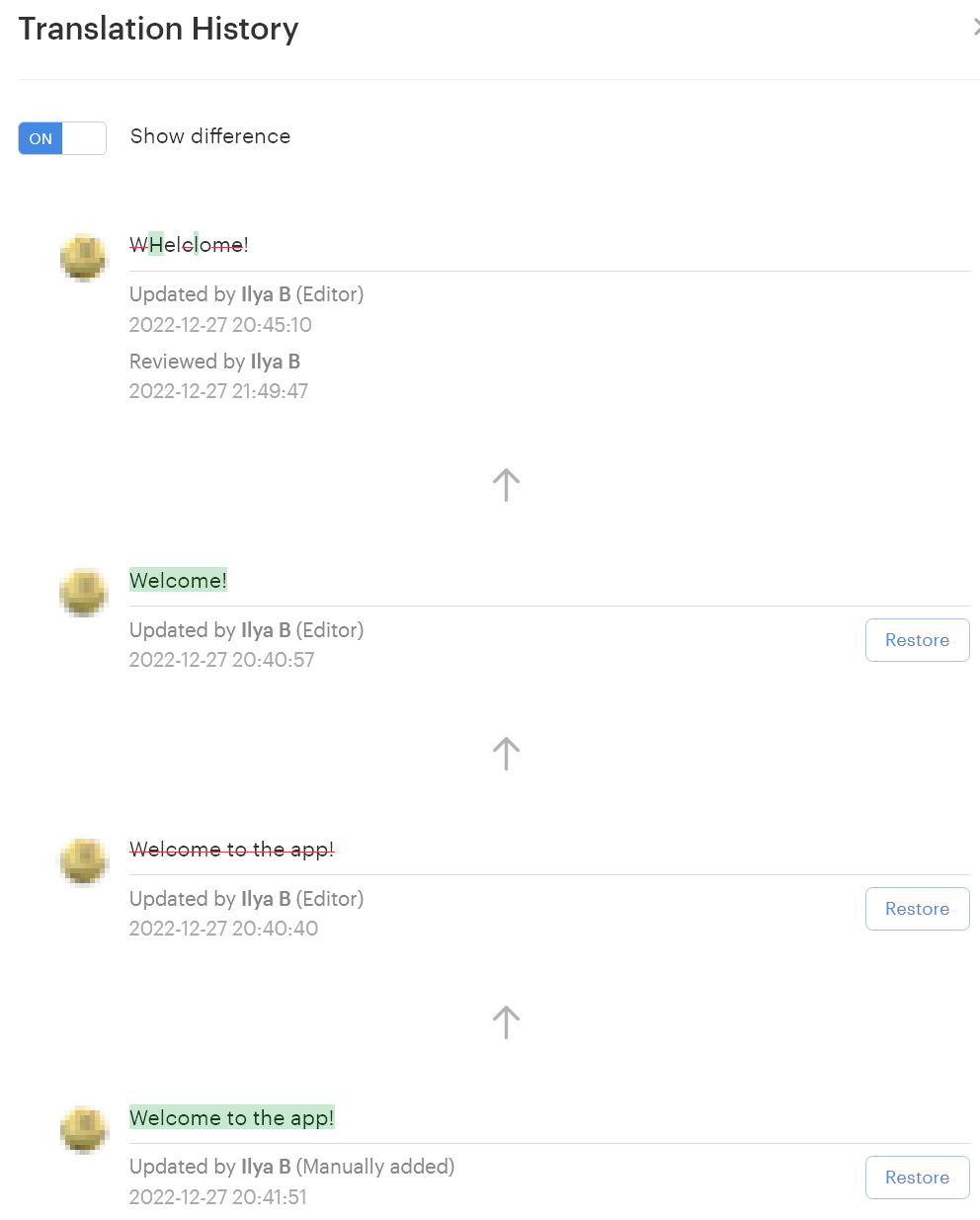
Lokalise's translation history feature shows every version of a translation string, including the user who submitted each version, the timestamp, and the previous value, with the ability to restore any prior version from the same panel.
To access this, open the string you want to investigate in the Lokalise editor and view its History panel.
This gives you a complete timeline of all changes made to that specific string, across all contributors.
Each entry in the timeline shows:
The user who made the change
The timestamp of the update
The previous value and the new value
This makes it easy to understand how a translation evolved over time and spot exactly where something changed. If a string looks incorrect, you can quickly compare versions and identify when the issue was introduced.
If needed, you can restore a previous version directly from the same panel. This is useful when an approved translation is overwritten or when a recent change introduces an error. Restoring a version immediately makes it the active translation again, and the action is recorded in the project activity log for full traceability.
This gives you a reliable way to audit and correct changes at the string level, without relying on external notes or manual version tracking.
How to maintain a clean audit trail across all linguistic assets
Lokalise Audit Logs, available on the Enterprise plan, capture all team-level events across every project — including logins, permission changes, key creation and deletion, project snapshot creation, and workflow status updates — providing a compliance-ready record of all localization activity.
When we talk about “all linguistic assets,” this goes beyond just translation strings. It includes everything that shapes your localized content, such as:
Translation keys and source strings
Translations across all languages
Translation memory entries
Glossary terms
Project settings and workflows
User roles and permissions
Keeping an audit trail across all of these ensures that every change is traceable, not just at the string level, but across the entire localization system.
Feature
Scope
What it tracks
Available on plan
Use case
Project Activity
Single project
Key edits, translation updates, comments, status changes
Compliance, security monitoring, and cross-project audits
Project Activity helps you understand what’s happening inside a specific project. Audit Logs give you a broader view across your entire organization, which is critical when you need to monitor access or prepare reports.
Exporting audit logs for reporting
Audit Logs can be exported via the Lokalise API, which allows teams to integrate audit data into their existing reporting or compliance workflows. This is especially useful for organizations that need to centralize logs in external systems such as security monitoring or internal audit tools.
💡 Pro tip
As part of your localization QA cycle, schedule a regular review of Audit Logs (for example, once a month or after major releases). This helps you:
Identify unusual activity or unexpected changes
Verify that permissions and workflows are used correctly
Maintain a consistent record for internal audits or compliance reviews
Localization key governance best practices
Strong audit trails come from consistent rules around access, visibility, and review. These practices help teams maintain accountability and keep localization workflows predictable at scale.
Assign the Contributor role to translators to prevent them from editing source strings or deleting keys. This reduces the risk of accidental changes to source content and keeps control with the right roles.
Lock approved source strings to create a single source of truth and prevent accidental edits by contributors. Once content is approved, locking it ensures consistency across languages and avoids unnecessary rework.
Review Project Activity logs weekly during active localization sprints to catch unauthorized or accidental changes early. Regular reviews help you spot issues before they reach production and avoid last-minute fixes.
Use Lokalise Audit Logs (Enterprise) to generate monthly compliance reports for regulated industries including healthcare, finance, and legal. This provides a structured record of changes that can be used for internal reviews or external audits.
Document key-level decisions using Lokalise key comments rather than external spreadsheets, so the rationale for each change stays attached to the key.
Integrate Lokalise Audit Log exports with your SIEM or compliance tooling via the Lokalise API for automated change monitoring at scale.
This is how you turn localization from a reactive process into a controlled system where changes are traceable and easier to manage.
Why localization audit trails matter in compliance and regulated industries
Lokalise Audit Logs provide the timestamped, user-attributed change records that regulated industries need to demonstrate localized content was reviewed, approved, and published by authorized personnel.
In regulated environments, it’s not enough to have the right content in place. Teams need a clear record of how that content was created and updated over time. Without that, it’s difficult to explain what changed, who approved it, and which version was active at a given moment.
For teams working under GDPR, this often applies to localized consent messages and user-facing disclosures. An audit trail helps teams trace which version of a consent string was live at a specific point in time and how it changed.
In healthcare, patient-facing content such as instructions, disclaimers, or treatment information needs to be reviewed and approved before publication. Audit trails help document who approved each translation and when those approvals happened.
In financial services, localized terms, disclosures, and product information must remain consistent and traceable across languages. When updates happen, teams need a reliable way to track what changed and how it aligns with approved content.
With reliable governance, localization becomes predictable. This is what Lokalise is built for.
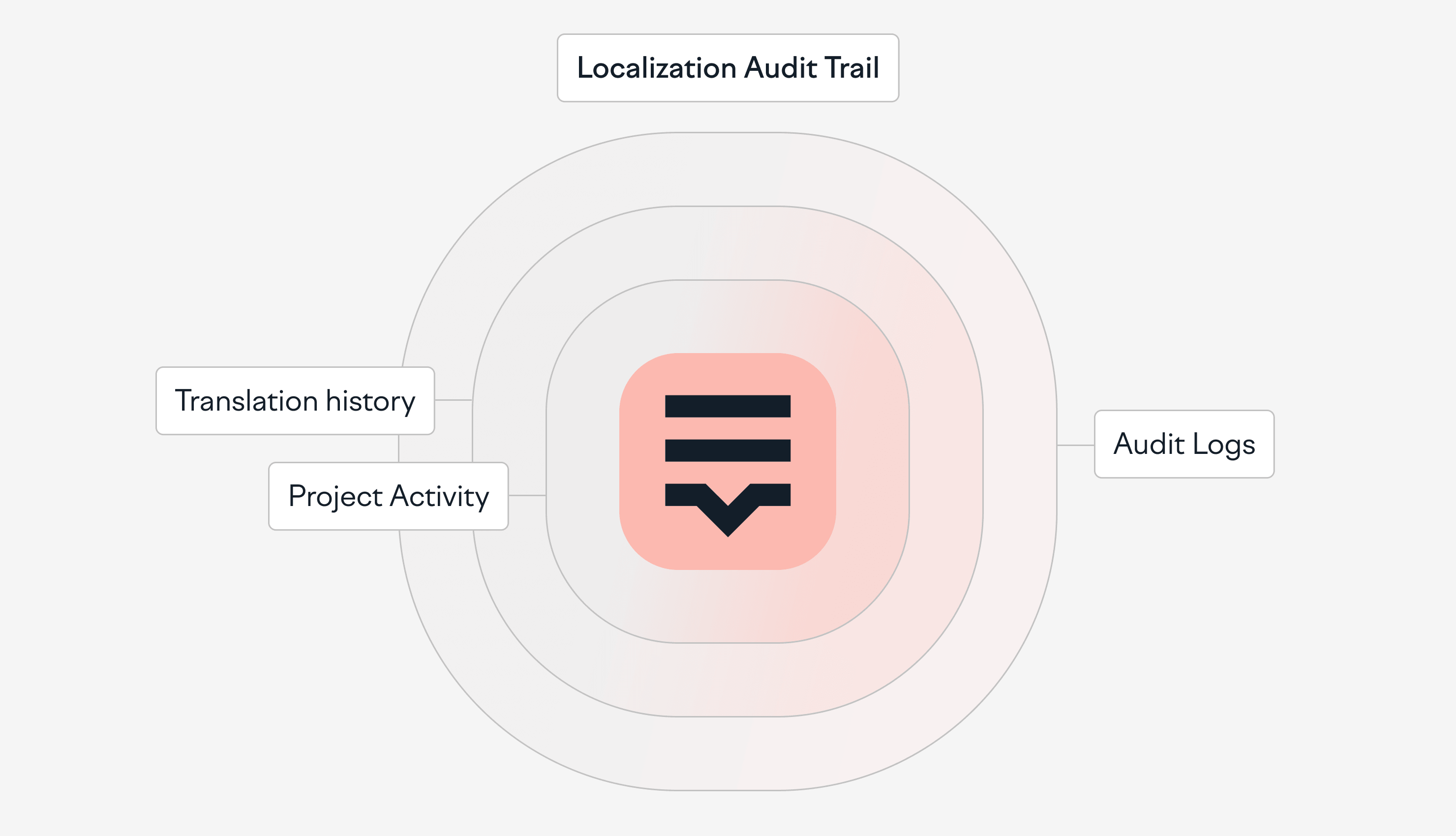
Lokalise uses three layers of tracking: Translation History for string-level changes, Project Activity for project-level visibility, and Audit Logs for team-wide traceability.
See why companies like Blockchain, Pleo, GoCrypto, Webgains, and Withings trust it as their localization platform: try it yourself for 14 days for free, no credit card required.
FAQs
What is a localization audit trail?
A localization audit trail is a chronological record of all changes made to translation keys, source strings, and linguistic assets within a TMS, including who made each change, when, and what the previous value was. Audit trails provide accountability in distributed translation teams and are required in regulated industries where localized content must be traceable to an authorized source. In Lokalise, audit trail data is captured at two levels: Project Activity for per-project key and translation changes, and Audit Logs for Enterprise-level team events.
How do you track which user changed a localization key in Lokalise?
Lokalise records all key-level changes in the Project Activity log, accessible from the project dashboard under the Activity tab. Each entry shows the user who made the change, the exact timestamp, and the nature of the action, including source string edits, translation updates, key renames, and status changes. Enterprise users can access Audit Logs from the Team settings page for cross-project visibility across all projects and users.
What is the difference between Project Activity and Audit Logs in Lokalise?
Project Activity shows change history scoped to a single Lokalise project, including edits to keys, translations, comments, and project settings. Audit Logs are available on the Enterprise plan and are team-wide, capturing a broader set of events including user logins, permission changes, API token activity, and project snapshot creation. Use Project Activity for day-to-day translation oversight, and Audit Logs for compliance reporting and security monitoring.
How do you restore a previous version of a localization string in Lokalise?
Lokalise's translation history feature stores every past version of a translation string. To restore a previous version, open the string in the Lokalise editor, access the History panel, select the version to restore, and click Restore. The restored version becomes the active translation, and the restoration action is itself logged in Project Activity.
Do you need an Enterprise plan to access audit logs in Lokalise?
Yes. Lokalise Audit Logs are available on the Enterprise plan. Teams on Pro plans have access to Project Activity, which provides per-project change tracking for keys and translations. Translation History (rollback to prior string versions) is available across all paid plans. Contact Lokalise sales to discuss Enterprise plan options if your team requires full audit log access for compliance purposes.
Mia has 13+ years of experience in content & growth marketing in B2B SaaS. During her career, she has carried out brand awareness campaigns, led product launches and industry-specific campaigns, and conducted and documented demand generation experiments. She spent years working in the localization and translation industry.
In 2021 & 2024, Mia was selected as one of the judges for the INMA Global Media Awards thanks to her experience in native advertising. She also works as a mentor on GrowthMentor, a learning platform that gathers the world's top 3% of startup and marketing mentors.
Earning a Master's Degree in Comparative Literature helped Mia understand stories and humans better, think unconventionally, and become a really good, one-of-a-kind marketer. In her free time, she loves studying art, reading, travelling, and writing. She is currently finding her way in the EdTech industry.
Mia’s work has been published on Adweek, Forbes, The Next Web, What's New in Publishing, Publishing Executive, State of Digital Publishing, Instrumentl, Netokracija, Lokalise, Pleo.io, and other websites.
Mia has 13+ years of experience in content & growth marketing in B2B SaaS. During her career, she has carried out brand awareness campaigns, led product launches and industry-specific campaigns, and conducted and documented demand generation experiments. She spent years working in the localization and translation industry.
In 2021 & 2024, Mia was selected as one of the judges for the INMA Global Media Awards thanks to her experience in native advertising. She also works as a mentor on GrowthMentor, a learning platform that gathers the world's top 3% of startup and marketing mentors.
Earning a Master's Degree in Comparative Literature helped Mia understand stories and humans better, think unconventionally, and become a really good, one-of-a-kind marketer. In her free time, she loves studying art, reading, travelling, and writing. She is currently finding her way in the EdTech industry.
Mia’s work has been published on Adweek, Forbes, The Next Web, What's New in Publishing, Publishing Executive, State of Digital Publishing, Instrumentl, Netokracija, Lokalise, Pleo.io, and other websites.
AI-powered tools all share one characteristic: They are powered by large language models (LLMs) like Open AI. Naturally, this has led to many of our customers questioning the security of their data in Lokalise AI. In a recent
8 software localization issues that could hurt your business, and how to avoid them
The localization process is not easy. You do not necessarily know all the languages you want to expand your product into, so you have to trust your teams that your international offer is solid and relevant. When localizing your software, there are a number of issues and challenges that are—unfortunately—almost inevitable. However, they are fixable. Discover in this article eight software localization issues, how they could harm your business, and what to do to overcome them.
Best fintech translation tools for secure and compliant localization
When you localize banking products, relying on “good enough” fintech translation services isn’t safe.The most secure option is a dedicated translation management system (TMS) suitable for fintech, like Lokalise. Your tool of choice needs to promise ISO 27001-grade security, granular access controls, reliable APIs, and strict glossary enforcement so every disclosure, rate, and fee description stays consistent and audit-ready. In this guide, you’ll find the best financial transl