
A new era of localization begins with Lokalise AI
Lokalise AI is a fully automated localization assistant that will change the way you think about translation.


You run a clean, well-structured string file through AI translation. The output is linguistically correct, but completely wrong for the UI.
This is the context deficit problem.
Without structured input about what a string is and where it lives, models default to general-purpose language patterns. The output looks coherent on its own, but breaks when placed in the interface.
Most dev teams try to fix this problem by switching models or adjusting prompts. The translations might improve slightly, then plateau at the same failure points. But the model isn't the problem here. It’s missing context.
Building that missing context yourself is a different job, with its own headcount and its own bill: the real cost of building in-house AI translation.
The fix: feed better context to AI translation tools.
In this article, we'll cover the three types of context that fix this: visual, deterministic, and structural. We’ll also share tactical guidance on how to feed these contexts to your AI translation workflow inside a translation management system.
💪 Take the next step with automation
This guide specifically focuses on what context to inject and how that context affects AI output. If you want to fix this context-deficit challenge at scale, learn to automate context management across multiple translation projects.
Without structured input about each translation string, LLMs try to fill the gaps with statistical guesswork. That guesswork can lead to hallucinations.
Close these gaps by offering three types of context for AI translation. Let’s understand how each one targets a different reason the model fails.
Without a screenshot or design frame, the LLM can't tell whether a string is a button label, a header, a tooltip, or something totally different. It can't identify the type of UI element it’s working with and where exactly this element fits in the UI.
Now, the model has to make a structural assumption without any visual information to guide it. As a result, the translation can be grammatically correct but still be completely wrong for the interface it appears in.
This is why you need visual context.
Visual context ties each string to its place and function in the interface it lives in. When the LLM can see the element type, the surrounding copy, and the spatial constraints, it doesn’t need to resort to guesswork. The output will automatically align with the UI.
A general-purpose LLM has no memory of your product. It doesn't know what your core features are called, which terms are trademarked, or how you've decided to handle a specific market.
Without that context, it fills these gaps with the best guess. At scale, that could look like hallucinated product names, inconsistent industry terms, and tone that drifts across markets.
Deterministic context replaces guesswork with rules and precedent.
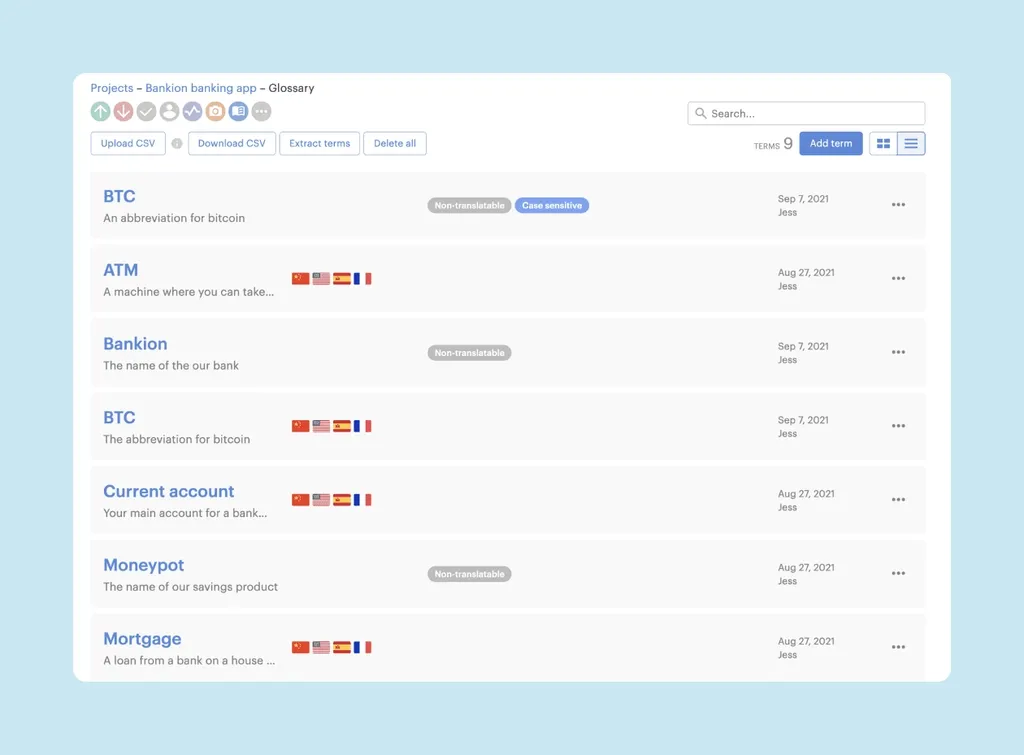
A glossary is the most direct form of this. For example, let’s take a SaaS product with a feature called “Workflows.” Without a glossary, AI translation models might translate this as “processes” or “automations” depending on the language.
But a glossary entry that marks “Workflows” as non-translatable, or specifies the approved translation per language, prevents the model from improvising on its own.
Structural context is what you embed in the code and file structure to give the model signals about what a string is before it translates it.
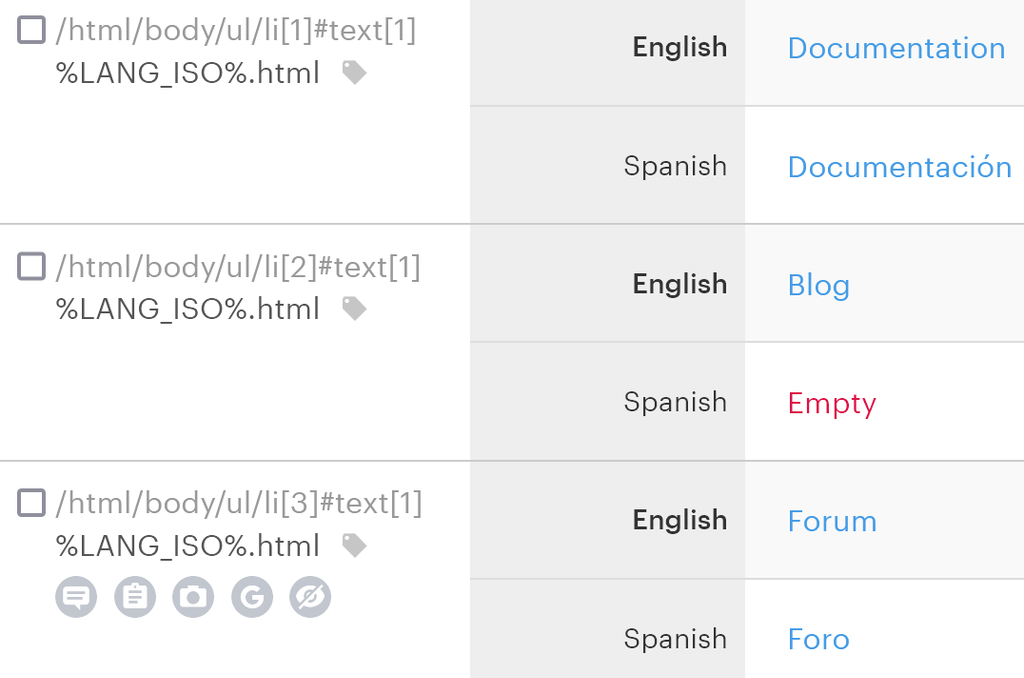
For example, a .po file has a msgctxt field. A data-lokalise attribute in your markup indicates where a string appears. Without these signals, the model has to work out the function from the string text alone, which can be ambiguous.
But an annotated comment like “button label, max 20 characters, imperative tone” gives LLMs enough context about each string. It eliminates ambiguity and adds specificity, producing a more relevant output.
Now that you know what kind of context to offer, here are five tactical methods for feeding this context to AI translation tools within your TMS.
A set of strings might look correct during translation, but break in the actual UI. They can break not just in terms of length, but also in their intent and purpose. For example, the button label runs longer than the container allows, and the tooltip reads like a CTA.
This isn't exactly a translation error in the linguistic sense. The output is grammatically correct.
But the problem is that the model was making structural decisions about every string's length, register, and function with no information about your UI to base them on. It defaulted to statistical likelihood, and this likelihood doesn't know your interface.
Consider what the model is doing without visual context.
It receives a string like “Save changes” and has to infer everything else. Is this a button or a confirmation dialog? How much space does it have? What's the surrounding copy? Without answers, the model picks the statistically most common interpretation. And this can be wrong for your specific context.
A screenshot attaches more input for every string and changes the model’s inference pattern.
When the model can see that “Save changes” sits inside a narrow button in the bottom-right of a form with other short-label actions nearby, it has dimensional awareness. It knows the element type, spatial constraints, and surrounding copy. So, the output is linguistically and contextually accurate.

Another important insight here is that the granularity of screenshots matters more than volume.
A full-screen capture gives the model very little signal to work with for any one string.
But a cropped screenshot isolating the element (with enough surrounding UI visible to establish context) is more helpful. The model can identify element type, character constraints, and intent for this string.
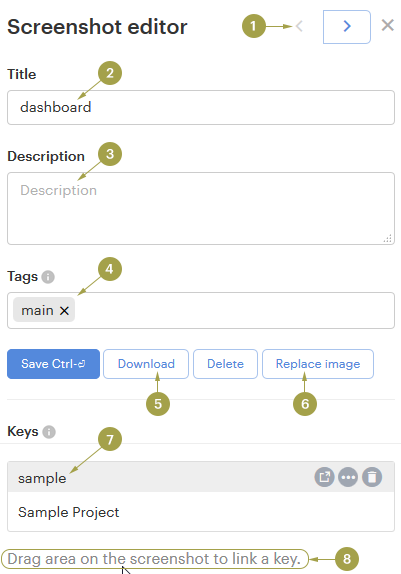
A TMS like Lokalise lets you upload screenshots directly to individual keys inside the project editor. When you run an AI translation task, the tool pulls the attached screenshot alongside the string before generating output.
Uploading screenshots solves the immediate problem, but creates a maintenance one: designs change, screenshots don't update themselves. Stale/outdated context is worse than no visual context because it forces the model to work from a false premise.
For example, a screenshot from three sprints ago shows a string inside a modal that no longer exists. The layout changed, and so did the character constraints. But the model still has the old frame. It's now making translation decisions based on a deprecated UI. As a result, the output inevitably doesn’t fit the current version.
But the bigger problem here is that this issue isn't easy to catch until something fails downstream.
If 40% of your keys have screenshots from a previous design iteration, you have a structural accuracy problem. And no amount of model-switching can find or fix this issue. The translations will look correct on paper, but fail in the UI.
The fix is to stop treating visual context as a one-and-done activity and make it a property of the string that's maintained at the design layer. When a design changes, the screenshot attached to that key on your TMS should change with it automatically. But don’t rely on someone to manually re-upload the new designs.
This is what design tool integrations with localization software solve.
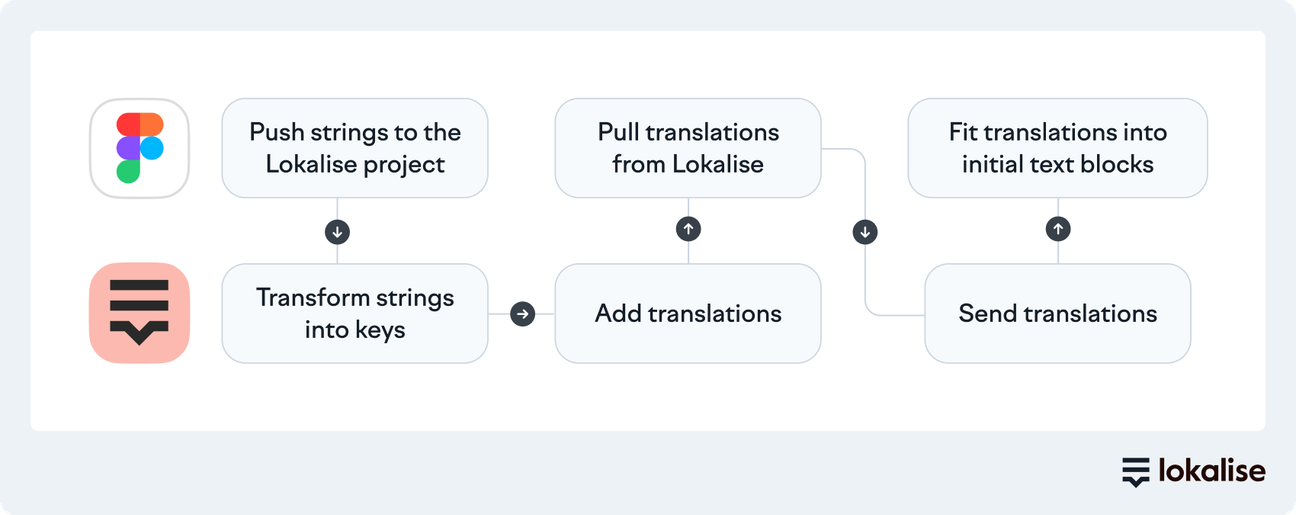
When Figma is connected to Lokalise, visual context travels with the string from the moment it enters the TMS. Designers can push updated frames directly to the corresponding keys. That means when a layout changes, the model's visual reference updates right away.
For dynamic UI states that static Figma frames can't capture, like loading states, error flows, empty states, LiveJS previews extend this to screen states that only exist at runtime. Lokalise’s in-context editor gives the model visual context for strings that would otherwise have none.
🧠 Food for thought
Even with screenshots and design references, LLMs don’t have enough context about your brand and product.
As a result, AI translations can translate the same feature in three different ways across a single release or create variations for different markets. This happens because there’s room for the model to work with its own interpretation instead of leaning on documented evidence of your brand context.
That’s why you need a glossary to train AI models on what’s allowed and constrained. A localization glossary will help you:
When you add per-language approved translations with usage notes, the model retrieves the approved version rather than generating a new one. It defines specific terms and prevents the model from improvising on them.
Consider a fintech product with a UI action called “Top up.” Without a glossary entry, a model translating into French might translate this to “recharger” or “alimenter.” These are technically valid, but carry a slightly different connotation.
Which one matches your product's tone and your users' expectations in that market? The model has no way to know this.
A glossary entry with the approved French equivalent and a usage note gives the model enough evidence to make this decision. Every instance of “Top up” across every project turns into the same output because of this rule.
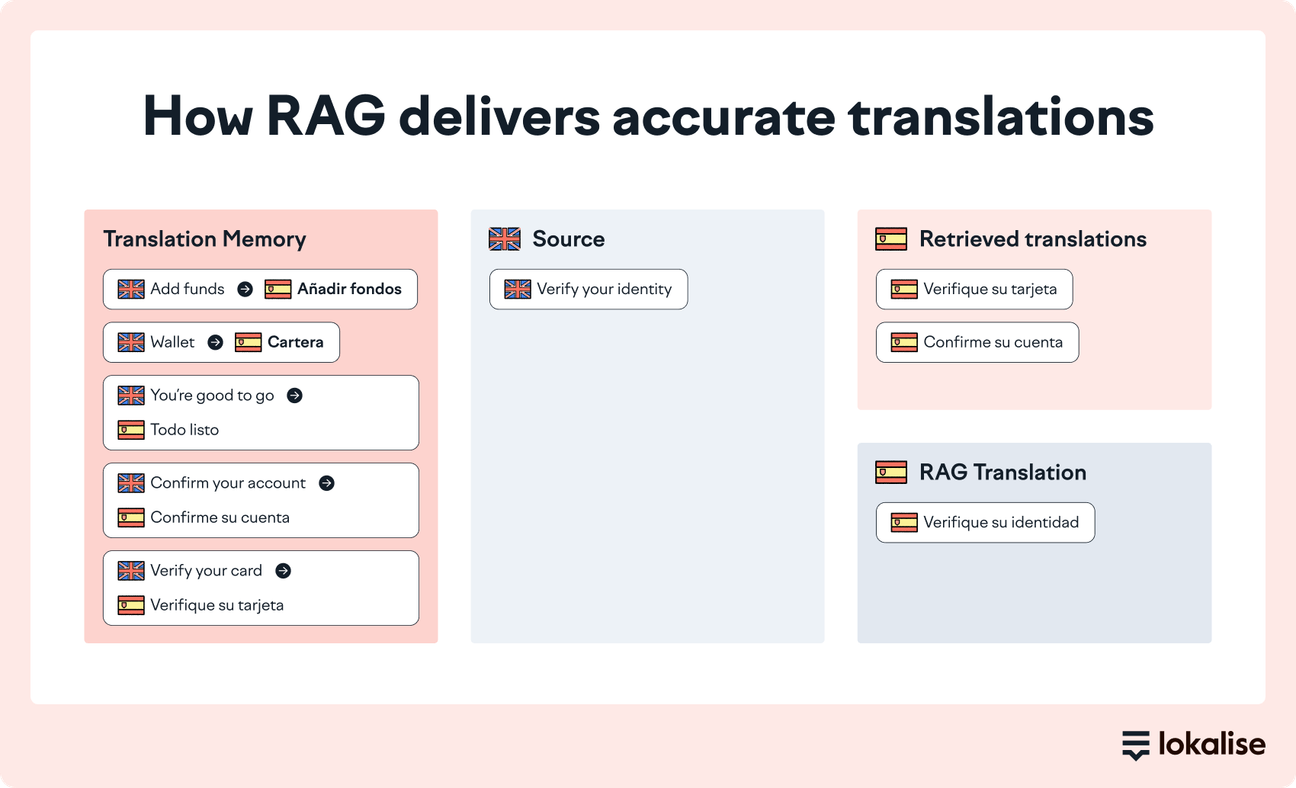
Translation memory works toward the same goal. It provides precedent to help models replicate existing translations and maintain accuracy.
Your TM stores every previously approved translation. When the models come across a string that matches something in your TM, it pulls the existing translation rather than generating a new one. This improves accuracy and LQA efficiency since you don’t have to double-check a string that’s already been reviewed and approved.
When sharing context through TM, make sure you consider match thresholds. If your TM is configured for 100% matches only, you’re missing out on meaningful deterministic coverage. Fuzzy matching at 70–80% similarity still constrains the model significantly on strings that are structurally close to approved ones.
Together, glossary and TM form the deterministic layer: they turn general-purpose language knowledge into something constrained by your product, your terminology decisions, and your translation history.
AI translation within a TMS like Lokalise uses Retrieval-Augmented Generation (RAG) to actively infuse this context. RAG actively infuses this context into your AI translation workflow. It acts as the retrieval layer that the model queries before generating output.
Without explicit brand guidance, AI models follow a neutral, generic register. The output sound is tonally static.
For functional strings like form labels, navigation items, and system messages, that's usually acceptable. But for copy where voice is load-bearing, generic output is a quality problem that won't surface in automated QA but will be immediately obvious to a native speaker. Think onboarding flows, empty states, error messages, and any surface where tone is part of the product experience.
That’s why you need a style guide. It tells the model who you are as a brand.
A prompt instruction can feel like “write in a friendly, direct tone” to describe the intent. The model interprets it through its own sense of what “friendly” and “direct” look like, which may or may not match yours.
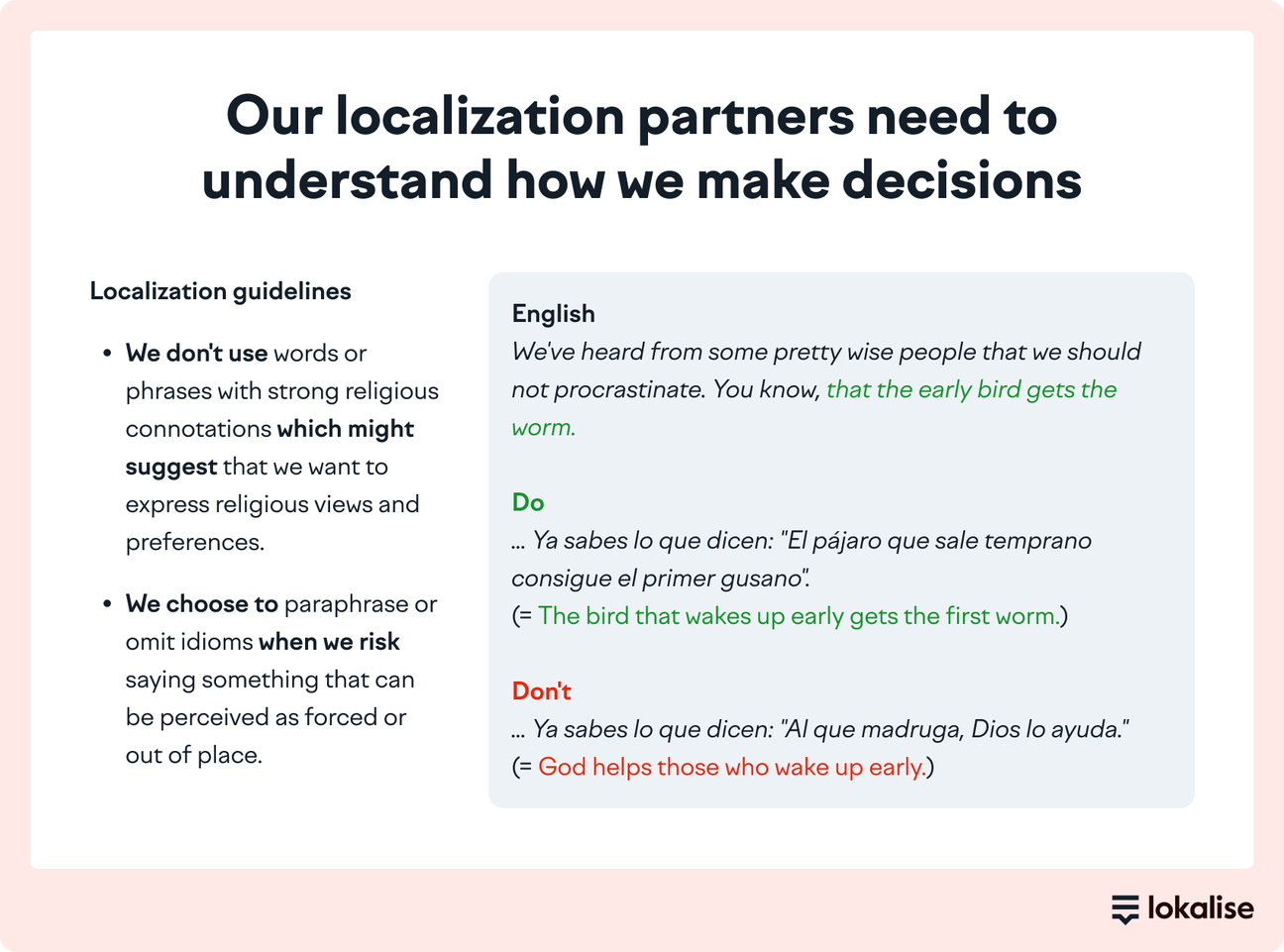
In contrast, a well-structured style guide provides examples of your brand voice in use. It shares guidelines specific to how you address your audience, along with explicit advice on what to avoid and why. The model is pattern-matching against demonstrated instances of your voice instead of approximating an abstract description of it.
For example, our style guide outlines rules with dos vs. don’ts and examples of how to apply them.
Language-specific style guides extend this further.
Brand voice isn't always portable across markets. A tone that reads as confident in English can read as aggressive in Japanese, or too casual in German. When you maintain separate guides per language, you can encode the market-specific tone your translators have already worked out.
✨ Add your style guide to Lokalise
In Lokalise, you upload a style guide as a PDF or DOCX file, assign it to specific projects, and sync it with Pro AI. Lokalise condenses it into a structured form that the model can retrieve. You don't need to reformat it as a prompt or re-inject it manually on each task.
Your TM and in-project translations are the accumulated evidence of every translation decision your team has made. Think terminology preferences, tone differences, and market-specific guidelines.
But when the model can't access these references, it falls back on statistical approximation again. As a result, the output is inconsistent with your guidelines. This inconsistency builds up across releases until it becomes a visible quality problem.
A surefire way to solve this is to make the translation history retrievable.
When an LLM queries your approved translations using the RAG method, it retrieves similar examples and generates output based on your established patterns. This is what Custom AI Profiles in Lokalise are built to do.
After you configure a custom profile, Lokalise uses RAG to fetch relevant entries from your TM or existing project translations and pass them to the model before generating output.
As a result, in-project consistency improves across the board because the model is drawing from the same translation pool your linguists have already signed off on.
🗒️ Note
Keep in mind that RAG amplifies whatever it retrieves. So, a profile built with a clean, reviewed TM will perform better than one built with an unreviewed database.
In Lokalise, you configure a profile by selecting source and target languages, a data source (TM entries or reviewed in-project translations), and the projects it applies to. Once active, it runs automatically on every translation task since context injection is built into the workflow.
AI translation usually fails because the model doesn't have what it needs to produce correct output.
Visual context tells AI what it's translating. Deterministic context tells it about your product. Structural context specifies which constraints apply. Together, this context eliminates hallucinations to generate high-quality translations.
Once you've established what context your AI translation workflow needs, the bigger challenge is making sure it's always present and updated without too much manual heavy lifting. That’s where you need to automate context management to translate projects at scale.
Sign up for a 14-day free trial on Lokalise to give this a try, and speed up your translation projects with powerful AI orchestration.
Author
Meet Rachel, our Content Manager and Lead Copywriter, who pivoted from advertising to SaaS and has never looked back.
Born and raised in the UK, Rachel has lived in London, Paris, Buenos Aires, and now Brussels. Through city-hopping, traveling, and her studies in French and Journalism, she’s picked up French and Spanish, and is now inventing her own language with help from her three-year-old daughter: Franglospanish!
Outside work, Rachel enjoys making (and eating) fresh pasta, drawing, and spending as much time as possible outside, cycling, hiking, or running.
Lokalise AI is a fully automated localization assistant that will change the way you think about translation.
AI-powered tools all share one characteristic: They are powered by large language models (LLMs) like Open AI. Naturally, this has led to many of our customers questioning the security of their data in Lokalise AI. In a recent
Can AI translation tools really replace human translators? Not quite, but they can still save you tons of time and effort. At Lokalise, we tested the top ten AI translation tools to find out which ones are worth your attention. Whether you need quick document translations, website localization, or real-time multilingual support, we’ve got you covered.








Behind the scenes of localization with one of Europe’s leading digital health providers
Read more Case studies



Localization workflow for your web and mobile apps, games and digital content.
©2017-2026
All Rights Reserved.
